.png)
Print Array Elements in Reverse Order
Problem Statement
Given an array of elements, the task is to print the elements of the array in reverse order.
Important:
This problem does not require modifying the array.
Only the order of printing is reversed.
Why This Problem Is Important
This problem helps in understanding:
- Array indexing from the end
- Reverse traversal using loops
- Index calculations (n - 1 to 0)
- Foundation for problems like array reversal, rotation, and stack operations
Input and Output Format
Input
Array: [1, 2, 3, 4, 5]
Output
Reverse order: 5 4 3 2 1
Key Concept
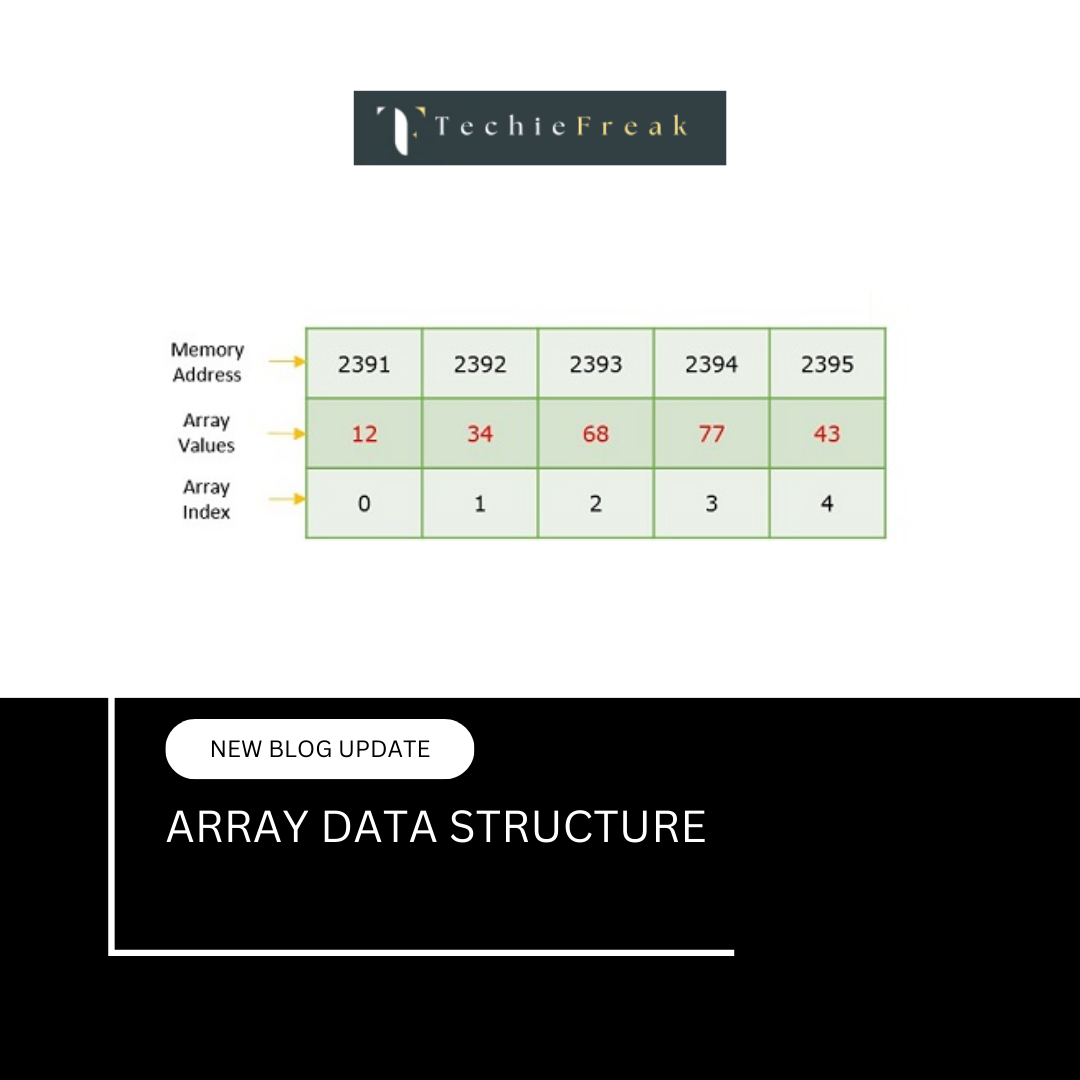
Arrays are stored in contiguous memory, and elements can be accessed directly using indices.
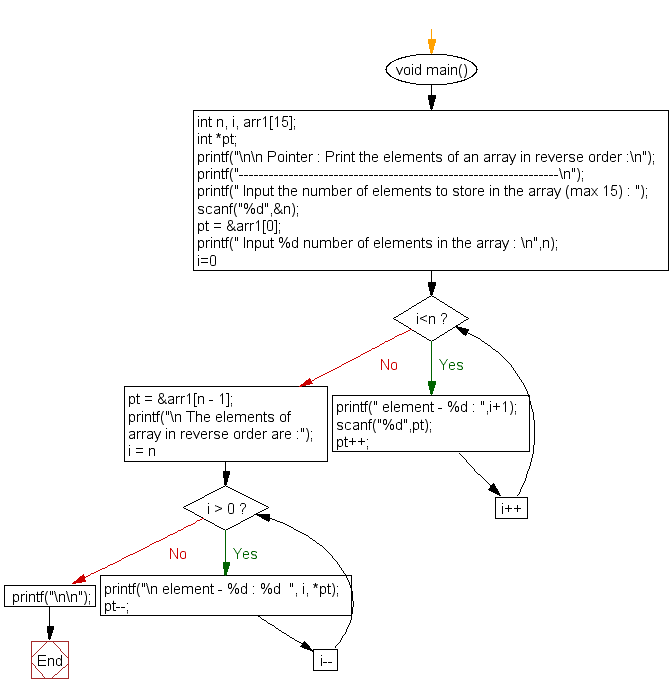
To print an array in reverse, we simply start from the last index and move backward.
Approach / Logic
- Find the size of the array (n)
- Start a loop from index n - 1
- Print each element while decrementing the index
- Stop when index reaches 0
Step-by-Step Algorithm
- Start
- Read array and size n
- Set index i = n - 1
- While i >= 0
- Print arr[i]
- Decrement i
- End
Pseudocode
n = length of array
for i = n-1 down to 0:
    print arr[i]
Dry Run Example
Array = [10, 20, 30, 40]

n = 4
i = 3 → print 40
i = 2 → print 30
i = 1 → print 20
i = 0 → print 10

Output: 40 30 20 10
Time and Space Complexity
| Metric | Value |
|---|---|
| Time Complexity | O(n) |
| Space Complexity | O(1) |
Only a single traversal is required, and no extra memory is used.
Language-wise Implementation
C Implementation
#include

int main() {
    int arr[] = {1, 2, 3, 4, 5};
    int n = sizeof(arr) / sizeof(arr[0]);

    printf("Array in reverse order: ");
    for(int i = n - 1; i >= 0; i--) {
        printf("%d ", arr[i]);
    }

    return 0;
}
Output
Array in reverse order: 5 4 3 2 1
C++ Implementation
#include
using namespace std;

int main() {
    int arr[] = {1, 2, 3, 4, 5};
    int n = sizeof(arr) / sizeof(arr[0]);

    cout << "Array in reverse order: ";
    for(int i = n - 1; i >= 0; i--) {
        cout << arr[i] << " ";
    }

    return 0;
}
Output
Array in reverse order: 5 4 3 2 1
Java Implementation
public class Main {
    public static void main(String[] args) {
        int[] arr = {1, 2, 3, 4, 5};

        System.out.print("Array in reverse order: ");
        for(int i = arr.length - 1; i >= 0; i--) {
            System.out.print(arr[i] + " ");
        }
    }
}
Output
Array in reverse order: 5 4 3 2 1
Python Implementation
arr = [1, 2, 3, 4, 5]

print("Array in reverse order:", end=" ")
for i in range(len(arr) - 1, -1, -1):
    print(arr[i], end=" ")
Output
Array in reverse order: 5 4 3 2 1
C# Implementation
using System;

class Program {
    static void Main() {
        int[] arr = {1, 2, 3, 4, 5};

        Console.Write("Array in reverse order: ");
        for(int i = arr.Length - 1; i >= 0; i--) {
            Console.Write(arr[i] + " ");
        }
    }
}
Output
Array in reverse order: 5 4 3 2 1
JavaScript Implementation
let arr = [1, 2, 3, 4, 5];

console.log("Array in reverse order:");
for (let i = arr.length - 1; i >= 0; i--) {
    process.stdout.write(arr[i] + " ");
}
Output
Array in reverse order:
5 4 3 2 1
Common Mistakes to Avoid
- Using incorrect loop condition (i > 0 instead of i >= 0)
- Modifying the array unintentionally
- Confusing printing in reverse with reversing the array
- Off-by-one index errors
Interview Variations
- Reverse the array in-place
- Print alternate elements in reverse
- Reverse a subarray
- Reverse array using recursion
Detailed Summary
Printing array elements in reverse order is a fundamental traversal problem that reinforces backward iteration and index management. By starting from the last index and moving toward the first, we can display the elements in reverse without altering the original array or using additional memory. This problem lays the groundwork for more advanced array manipulation tasks such as in-place reversal, rotation, and stack-based processing.
.png)
.png)
.png)
.png)
.png)
.png)
.png)
.png)
.png)
.png)
.png)
.png)
.png)
.png)
.png)
.png)
.png)
.png)
.png)
.png)
.png)
.png)
.png)
.png)
.png)
.png)
.png)
.png)
.png)
.png)
.png)
.png)
.png)
.png)
.png)
.png)
.png)
.png)
.png)
.png)
.png)
.png)
.png)
.png)
.png)
.png)
.png)
.png)
.png)
.png)
.png)
.png)
.png)
.png)
.png)
.png)
.png)
.png)
.png)
.png)
.png)
.png)
.png)
.png)
.png)
.png)
.png)
.png)
.png)
.png)
.png)
.png)
.png)
.png)
.png)
.png)
.png)
.png)
.png)
.png)
.png)
.png)
.png)
.png)
.png)
.png)
.png)
.png)
.png)
.png)
.png)
.png)
.png)
.png)
.png)
.png)
.png)
.png)
.png)
.png)
.png)
.jpg)
.png)
.jpg)
.jpg)
.png)
