.png)
Array Memory Representation
A Detailed Explanation of How Arrays Are Stored in Memory
Introduction
To truly understand how arrays work, it is not enough to know how to declare or access them. One must understand how arrays are stored in memory. Memory representation explains why array access is fast, why insertion is costly, and why arrays are cache-friendly.
This topic builds directly on the Introduction to Array Data Structure and forms the foundation for advanced concepts like two-dimensional arrays, matrix operations, and performance optimization.
What Is Memory Representation?
Memory representation refers to the way a data structure is physically stored in computer memory. In the case of arrays, memory representation explains:
- Where array elements are stored
- How their addresses are calculated
- Why arrays support constant-time access
- How multi-dimensional arrays are laid out
Arrays use a contiguous memory allocation strategy, which means all elements are stored next to each other in memory.
Contiguous Memory Allocation in Arrays
In an array, memory is allocated as one continuous block.
If an array contains n elements, the system allocates memory for all n elements together, without any gaps.
Because of this:
- Every element is placed at a predictable distance
- Accessing any element is fast
- CPU cache utilization is efficient
This is the most important property of arrays.
Base Address of an Array
The base address is the memory address of the first element of the array.
Let:
- BA = base address of the array
- i = index of the element
- w = size of each element (in bytes)
Then, the address of the element at index i is:
Address(arr[i]) = BA + (i × w)
This formula explains why arrays support random access.
The computer does not need to traverse elements one by one. It directly calculates the address.
Why Array Access Takes O(1) Time
Since:
- The base address is known
- Each element occupies a fixed size
- The address is computed mathematically
Accessing any element takes constant time, regardless of the array size.
This is why:
- arr[0]
- arr[500]
- arr[n-1]
all take the same time to access.
Memory Representation of One-Dimensional Arrays
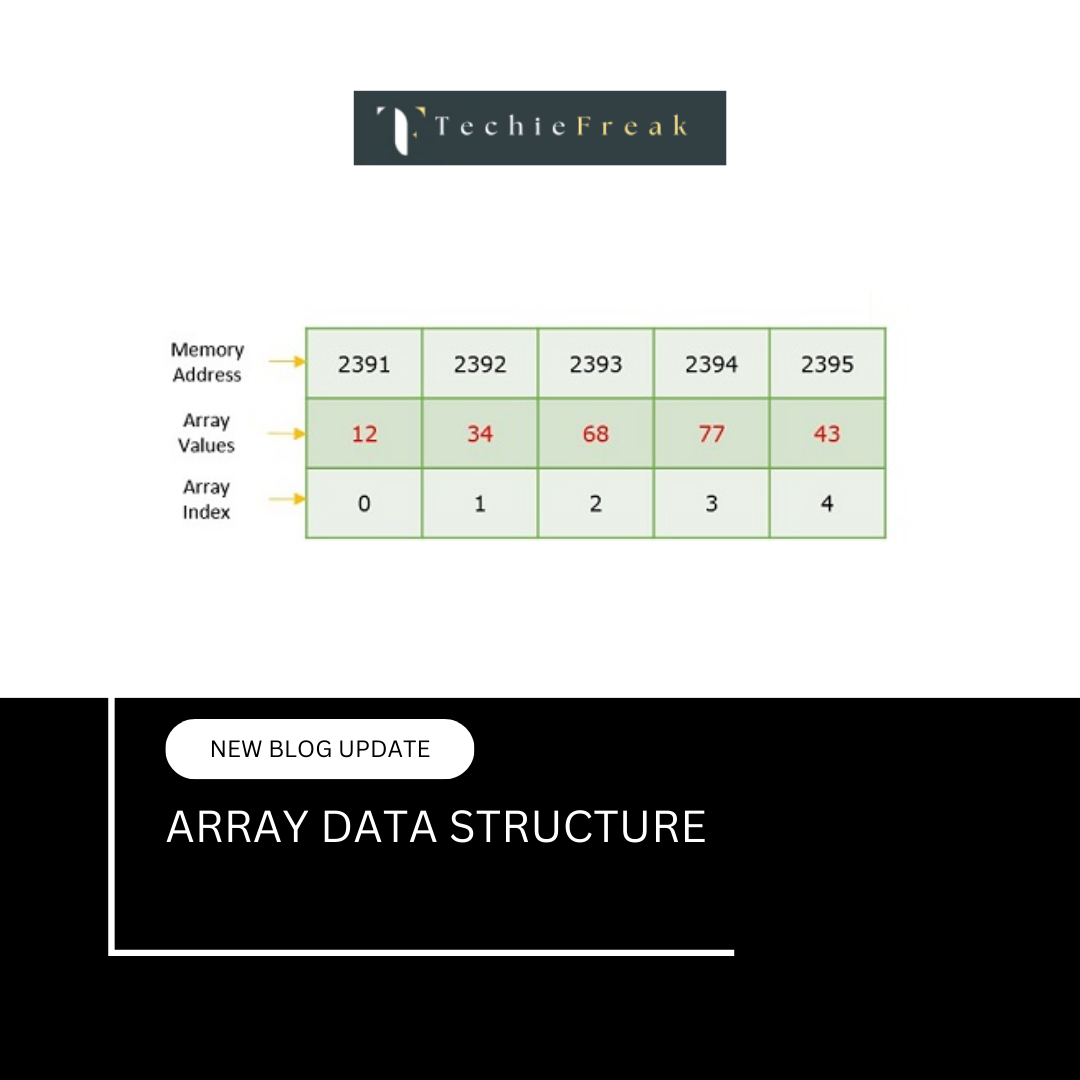
A one-dimensional array is stored in contiguous (continuous) memory locations.
Each element occupies the same amount of memory, and elements are placed one after another.
Example Declaration
int arr[5] = {10, 20, 30, 40, 50};
Given:
- Base Address = 1000
- Size of int = 4 bytes
- Number of elements = 5
Memory Layout
| Array Element | Address | Value |
|---|---|---|
| arr[0] | 1000 | 10 |
| arr[1] | 1004 | 20 |
| arr[2] | 1008 | 30 |
| arr[3] | 1012 | 40 |
| arr[4] | 1016 | 50 |
Visualization
Address →  Value
1000     → 10
1004     → 20
1008     → 30
1012     → 40
1016     → 50
Each element is stored exactly after the previous element, with a gap equal to the size of the data type.
Address Calculation Formula
For a 1D array, the address of any element is calculated as:
Address(arr[i]) = Base Address + (i × Size of Data Type)
Example:
Address(arr[3]) = 1000 + (3 × 4)
                = 1000 + 12
                = 1012
Key Characteristics
- Stored in contiguous memory
- Constant-time access (O(1)) using index
- Supports direct access
- Efficient traversal using loops
- Memory usage is predictable
Advantages of Contiguous Memory Storage
- Faster access due to locality of reference
- Simple address calculation
- Easy implementation in low-level languages
Limitations
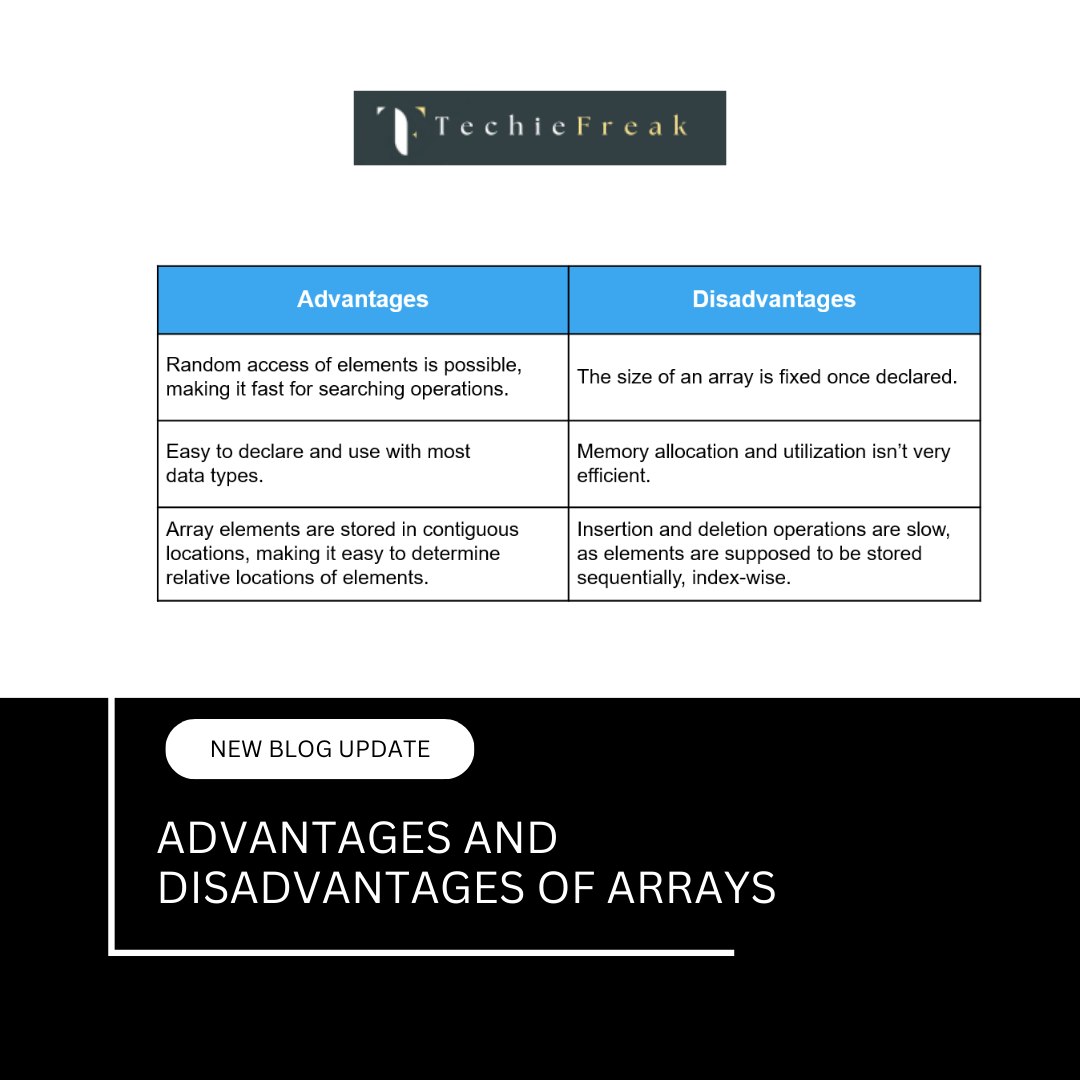
- Fixed size (for static arrays)
- Insertion and deletion are costly
- Wasted memory if size is not fully utilized
Memory Representation of Two-Dimensional Arrays
Although a 2D array looks like a grid of rows and columns, memory is always linear.
So, a two-dimensional array is stored internally as a one-dimensional contiguous block of memory.
The way elements are arranged depends on the storage order used by the programming language.
Storage Orders of 2D Arrays
There are two common memory storage methods:
- Row-Major Order
- Column-Major Order
1. Row-Major Order
In row-major order, all elements of the first row are stored first, followed by the second row, and so on.
Languages Using Row-Major Order
- C
- C++
- Java
- Python
Example Declaration
int arr[2][3] = {
  {1, 2, 3},
  {4, 5, 6}
};
Logical Representation
1   2   3
4   5   6
Memory Layout (Row-Major)
1 → 2 → 3 → 4 → 5 → 6
Address Calculation Formula (Row-Major)
Let:
- BA = Base Address
- i = Row index
- j = Column index
- C = Total number of columns
- w = Size of one element (bytes)
Address(arr[i][j]) = BA + ((i × C + j) × w)
Example Calculation
If:
- BA = 1000
- w = 4 bytes
- C = 3
- Element = arr[1][2]
Address = 1000 + ((1 × 3 + 2) × 4)
        = 1000 + (5 × 4)
        = 1020
2. Column-Major Order
In column-major order, all elements of the first column are stored first, followed by the second column, and so on.
Languages Using Column-Major Order
- Fortran
- MATLAB
Memory Layout (Column-Major)
For the same array:
1 → 4 → 2 → 5 → 3 → 6
This means:
- Column 0 stored first: 1, 4
- Column 1 stored next: 2, 5
- Column 2 stored last: 3, 6
Address Calculation Formula (Column-Major)
Let:
- BA = Base Address
- i = Row index
- j = Column index
- R = Total number of rows
- w = Size of one element
Address(arr[i][j]) = BA + ((j × R + i) × w)
Comparison Table
| Feature | Row-Major Order | Column-Major Order |
|---|---|---|
| Storage | Row by row | Column by column |
| Languages | C, C++, Java, Python | Fortran, MATLAB |
| First Stored | Complete first row | Complete first column |
| Formula | (i × C + j) × w | (j × R + i) × w |
Why Programming Languages Prefer Row-Major Order
Row-major order:
- Matches how arrays are accessed in loops
- Improves cache performance
- Is easier to implement in compilers
That is why most mainstream languages use it.
Cache Locality and Arrays
Arrays are cache-friendly due to spatial locality.
When a CPU accesses a memory location:
- Nearby memory locations are also loaded into cache
Since array elements are stored contiguously:
- Accessing arr[i] often loads arr[i+1], arr[i+2], etc.
- Sequential traversal becomes very fast
This is why loops over arrays are highly efficient.
Memory Representation in Different Languages
C / C++ / Java (Primitive Arrays)
- Actual values are stored contiguously
- Predictable memory layout
- Very efficient
Python / JavaScript / Java (Objects)
- References are stored contiguously
- Actual objects may be elsewhere in memory
- Slight overhead, but flexible
This difference affects:
- Performance
- Memory usage
- Cache efficiency
Limitations of Contiguous Memory Allocation
While contiguous memory offers speed, it also has drawbacks:
- Insertion and deletion are costly
- Elements must be shifted
- Fixed size (in static arrays)
- Memory must be allocated in advance
- Memory allocation failure
- Large contiguous blocks may not be available
These limitations lead to the use of dynamic arrays and linked structures.
Why Memory Representation Matters
Understanding array memory representation helps in:
- Writing optimized code
- Avoiding index errors
- Solving 2D array problems
- Understanding pointer arithmetic
- Improving performance in large-scale systems
It is a core topic for:
- Data Structures
- System Programming
- Competitive Programming
- Technical Interviews
Relationship with Other Array Topics
This topic directly connects to:
- Array Operations and Time Complexity
- Arrays in C (pointer arithmetic)
- Matrix traversal problems
Cache optimization techniques
Next Topic:
Array Operations and Time Complexity
.png)
.png)
.png)
.png)
.png)
.png)
.png)
.png)
.png)
.png)
.png)
.png)
.png)
.png)
.png)
.png)
.png)
.png)
.png)
.png)
.png)
.png)
.png)
.png)
.png)
.png)
.png)
.png)
.png)
.png)
.png)
.png)
.png)
.png)
.png)
.png)
.png)
.png)
.png)
.png)
.png)
.png)
.png)
.png)
.png)
.png)
.png)
.png)
.png)
.png)
.png)
.png)
.png)
.png)
.png)
.png)
.png)
.png)
.png)
.png)
.png)
.png)
.png)
.png)
.png)
.png)
.png)
.png)
.png)
.png)
.png)
.png)
.png)
.png)
.png)
.png)
.png)
.png)
.png)
.png)
.png)
.png)
.png)
.png)
.png)
.png)
.png)
.png)
.png)
.png)
.png)
.png)
.png)
.png)
.png)
.png)
.png)
.png)
.png)
.png)
.png)

.jpg)
.png)
.jpg)
.jpg)
.png)
