.png)
Arrays in C –
(From Memory Model to Real-World Bugs)
1. Arrays in C: Conceptual Definition (Compiler Level)
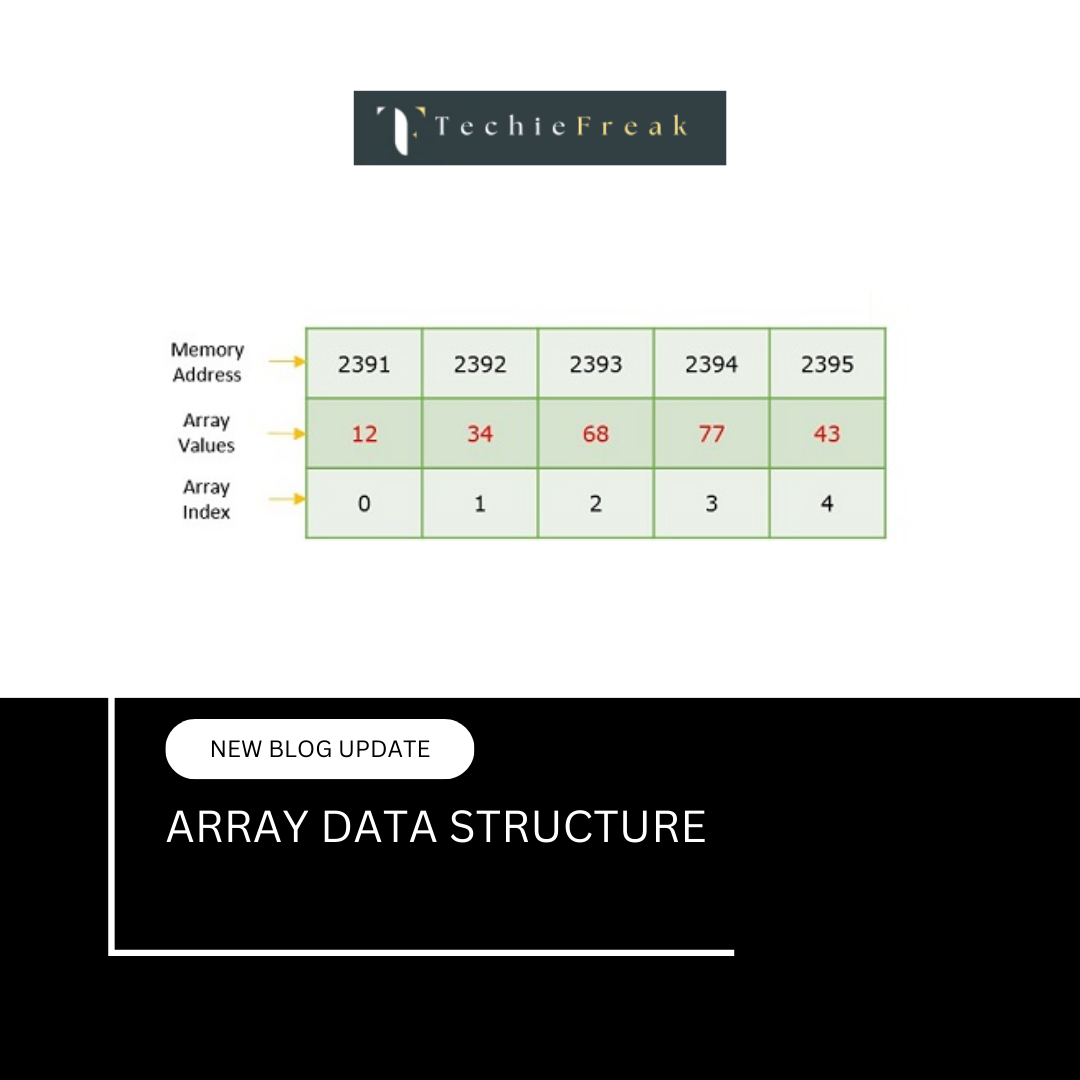
In C, an array is a contiguous block of memory locations that stores elements of the same data type, accessed using zero-based indexing.
But internally, the compiler treats an array as:
- A symbolic name bound to a fixed memory location
- NOT a variable
- NOT a pointer variable
- A block whose size is known at compile time (for static arrays)
This is critical:
An array name is not modifiable.
2. Array Declaration: What Compiler Actually Does
Code
int arr[5];
Compiler actions:
- Reserves 5 × sizeof(int) bytes
- Chooses stack or data segment (based on scope)
- Associates symbol arr with the base address
- No default initialization for local arrays
If declared globally:
int arr[5];
→ Automatically initialized to 0.
3. Where Arrays Live in Memory
| Array Type | Memory Segment |
|---|---|
| Global array | Data segment |
| Static array | Data segment |
| Local array | Stack |
| Dynamic array | Heap |
Example
int globalArr[10];        // Data segment
static int staticArr[5]; // Data segment

int main() {
    int localArr[5];     // Stack
}
4. Array Name vs Pointer: Deep Truth
| Property | Array Name | Pointer |
|---|---|---|
| Stores address | Yes | Yes |
| Modifiable | No | Yes |
| Size info | Yes (compile time) | No |
| Arithmetic | Limited | Full |
| Reassignable | No | Yes |
Proof Code
int arr[5];
int *p = arr;

p = p + 1;    // valid
arr = arr+1; // invalid
Why?
- arr is a constant pointer
- p is a variable pointer
5. Array Decay Rule
In most expressions, the name of an array automatically converts (decays) into a pointer to its first element.
In simple words
- arr → behaves like &arr[0]
- Type becomes pointer to element type
Basic Example
int arr[5];
int *p = arr;
What Happens Internally
- arr decays to &arr[0]
- p stores the address of the first element
Equivalent to:
int *p = &arr[0];
Memory Relation
arr      → address of first element
&arr[0]  → address of first element
But types are different:
- arr → int[5]
- &arr → int (*)[5]
When Array Decay DOES NOT Happen
Array decay does not occur in the following cases:
A. When used with sizeof method
Example
sizeof(arr);
Explanation
- Returns total size of the array
- Array name is treated as a complete array, not a pointer
If:
- int = 4 bytes
- arr[5]
Then:
sizeof(arr) = 5 × 4 = 20 bytes
. When Used with Address-of Operator (&)
Example
sizeof(&arr);
Explanation
- &arr gives the address of the entire array
- Type becomes pointer to array, not pointer to element
| Expression | Type |
|---|---|
| arr | int[5] |
| &arr | int (*)[5] |
3. When Array Is a Function Parameter
Example
void func(int arr[]) {
    printf("%lu", sizeof(arr));
}
Explanation
- Array parameter automatically decays to pointer
- Compiler treats it as:
void func(int *arr)
So:
sizeof(arr) // returns size of pointer, NOT array
Comparison Example
int arr[5];

printf("%lu\n", sizeof(arr));    // 20 bytes
printf("%lu\n", sizeof(&arr));   // size of pointer to array
Key Differences Table
| Expression | Meaning | Decay? |
|---|---|---|
| arr | Pointer to first element | Yes |
| &arr | Pointer to whole array | No |
| sizeof(arr) | Total array size | No |
| sizeof(&arr) | Pointer size | No |
| Array as parameter | Pointer | Already decayed |
Important Exam Points
Array name decays to pointer to first element
Decay does not happen with sizeof and &
Arrays passed to functions lose size information
arr and &arr point to same address but have different types
Common Interview Trick Question
int arr[10];
printf("%lu %lu", sizeof(arr), sizeof(arr + 1));
Output
40 8 // (on 64-bit system)
Why?
- arr → array (40 bytes)
- arr + 1 → pointer arithmetic → size of pointer
6. size of Array vs size of Pointer (Critical)
What is a Pointer?
A pointer is a variable that stores the address of another variable.
int x = 10;
int *p = &x; // p stores the address of x - p does not store the value 10
- It stores where 10 is located in memory
Code
#include

int main() {
    int arr[10];
    int *p = arr;

    printf("%lu\n", sizeof(arr)); // 40
    printf("%lu\n", sizeof(p));   // 8
}
Why?
- arr → full block
- p → only address
Difference Between Array and Pointer
| Feature | Array | Pointer |
|---|---|---|
| Definition | Collection of elements of same type stored contiguously | Variable that stores address of another variable |
| Memory | Allocates actual memory for elements | Stores only an address |
| Size (sizeof) | Total size = number of elements × size of datatype | Fixed size (4 bytes in 32-bit, 8 bytes in 64-bit) |
| Address | Array name represents base address | Pointer holds an address |
| Reassignment | ❌ Cannot be reassigned | ✅ Can be reassigned |
| Indexing | Direct indexing (arr[i]) | Indirect (*(p + i)) |
| Arithmetic | Limited | Full pointer arithmetic allowed |
| When passed to function | Converted to pointer | Passed as pointer |
| Memory ownership | Owns its memory | Does not own memory |
| Initialization | int arr[3] = {1,2,3}; | int *p = arr; |
Example
int arr[3] = {10, 20, 30};
int *p = arr;
Accessing elements
arr[1];      // 20
p[1];        // 20
*(p + 1);    // 20
Same output, different meaning internally
7. Array Indexing: Compiler Translation
Code
arr[i]
Internally converted to:
*(arr + i)
Even:
i[arr]
is valid in C (because addition is commutative).
8. Pointer Arithmetic: Byte-Level Explanation
Assume:
int arr[3];
If base address = 1000
| Expression | Address |
|---|---|
| arr | 1000 |
| arr+1 | 1004 |
| arr+2 | 1008 |
Because:
arr + i = base + i × sizeof(int)
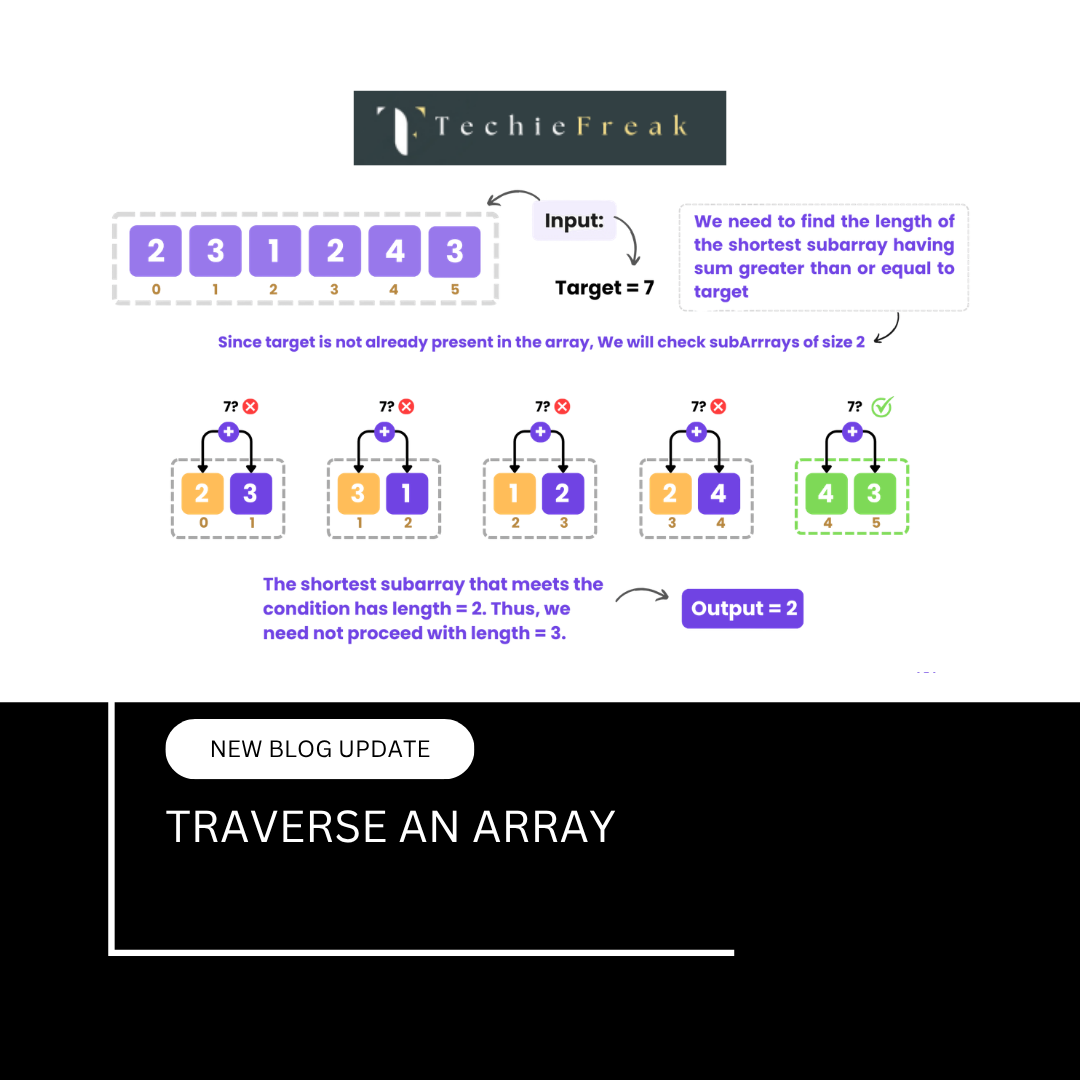
9. Traversing Arrays: Assembly Perspective
Index Traversal
arr[i]
Pointer Traversal
*(p+i)
Modern compilers generate same assembly code for both.
So:
- Choice is readability
- Not performance
10. Multidimensional Arrays: Memory Reality
Declaration
int a[2][3];
Memory:
a[0][0] a[0][1] a[0][2] a[1][0] a[1][1] a[1][2]
C uses row-major order.
11. Address Formula for 2D Arrays
For:
int a[R][C];
Address of a[i][j]:
Base + ((i × C) + j) × sizeof(int)
Compiler MUST know column size.
12. Why int** Is NOT a 2D Array
Wrong Thinking
int **p;
Many people think this represents a 2D array.
This is incorrect.
Reality
What int** Means
int** → pointer to a pointer to int
It means:
- p points to a pointer
- That pointer points to an int
Memory Representation
p
 ↓
ptr1 ──► int
This structure does not guarantee contiguous memory.
What a 2D Array Actually Is?
Definition
A 2D array is an array of arrays stored in contiguous memory.
Example
int a[2][3];
This means:
- a is an array of 2 elements
- Each element is an array of 3 ints
Memory layout:
[1][2][3][4][5][6] // contiguous
Key Difference
| Aspect | int** | int[2][3] |
|---|---|---|
| Nature | Pointer to pointer | Array of arrays |
| Memory | Not contiguous | Contiguous |
| Row size known? | ❌ No | ✅ Yes |
| Pointer arithmetic | Different | Predictable |
| Compiler knows layout | ❌ No | ✅ Yes |
Why int** Fails as a 2D Array
Example
int a[2][3];
int **p = a;   // ❌ WRONG
Why Wrong?
- a decays to int (*)[3]
- But int** expects int*
- Types are incompatible
Correct Pointer for a 2D Array
Correct Declaration
int (*p)[3] = a;
What This Means
p → pointer to an array of 3 integers
Now:
p[i][j] // works correctly
Understanding int in This Context
What Is int?
int is:
- A basic data type
- Typically occupies 4 bytes
- Used to store whole numbers
In:
int (*p)[3];
- int → type of each element
- [3] → number of columns
- (*p) → pointer
- Full meaning:
p is a pointer to an array of 3 integers
Visual Comparison
int** (Pointer to Pointer)
p ──► p1 ──► int
2D Array Pointer (int (*p)[3])
p ──► [int int int] [int int int]
Important Exam Points
✔ int** ≠ 2D array
✔ 2D array = array of arrays
✔ Use int (*p)[columns]
✔ Compiler must know column size
✔ int** is suitable for jagged arrays, not true matrices
When int** Is Actually Useful
- Dynamic jagged arrays
- When each row has different size
- Dynamic memory allocation using malloc
13. Passing Arrays to Functions (Deep)
When passed:
func(arr);
Compiler converts to:
func(&arr[0]);
Only address is passed → no copy.
Code
void modify(int arr[]) {
    arr[0] = 99;
}
Change reflects in main.
14. Passing 2D Arrays to Functions
Correct Way
void func(int arr[][3], int rows);
Or
void func(int (*arr)[3], int rows);
Column size mandatory.
15. Dynamic Arrays: Step-by-Step Internals
Code
int *arr = malloc(5 * sizeof(int));
What happens:
- Heap memory allocated
- Base address returned
- Pointer stores address
- Programmer responsible for free
Memory Leak Example
arr = malloc(10 * sizeof(int));
// lost old pointer → leak
16. realloc(): How Dynamic Arrays Grow
arr = realloc(arr, 10 * sizeof(int));
Possible outcomes:
- Memory extended in place
- New block allocated and copied
- Old block freed automatically
17. Static vs Dynamic Arrays (Deep Comparison)
| Feature | Static | Dynamic |
|---|---|---|
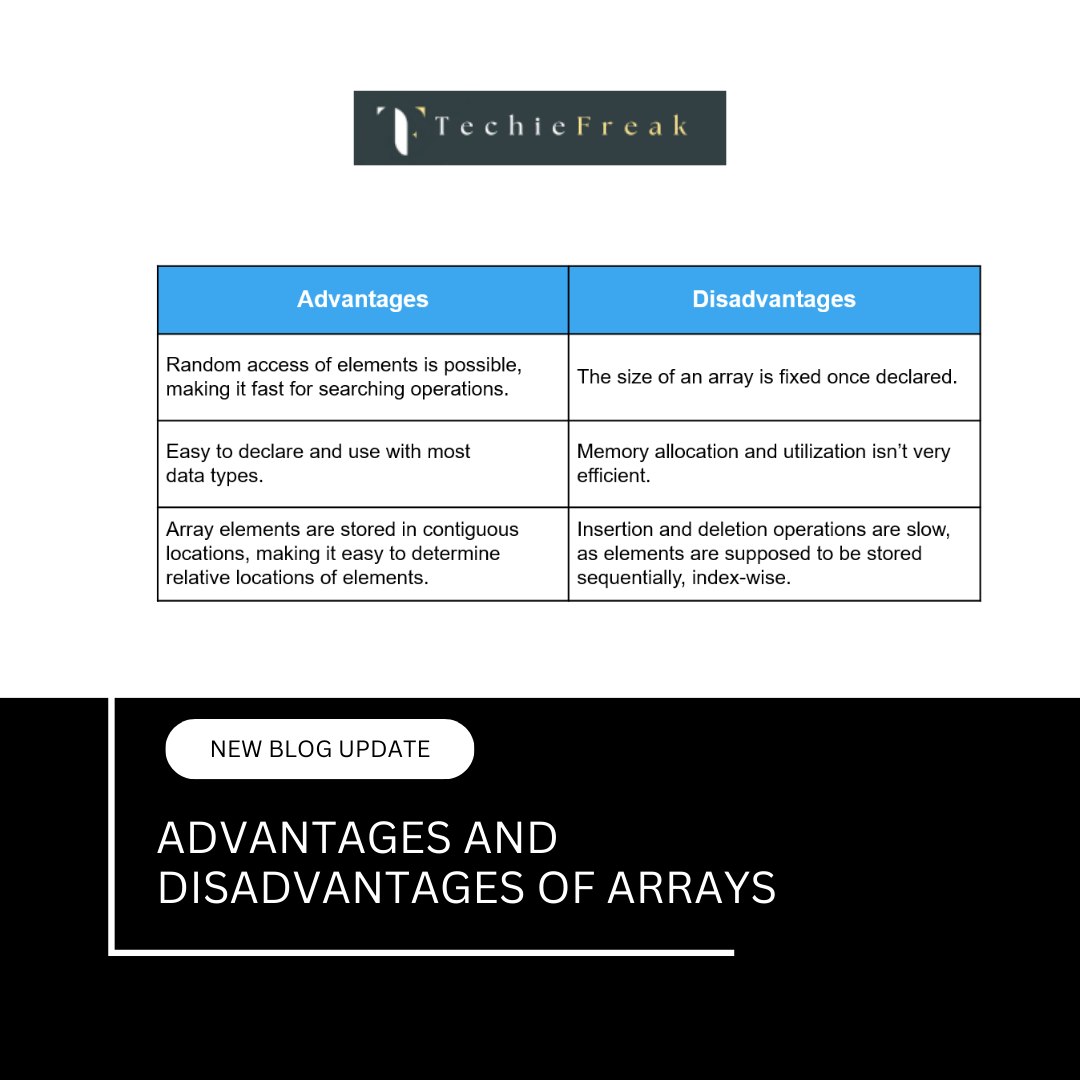
| Allocation time | Compile | Runtime |
| Resize | Impossible | Possible |
| Speed | Faster | Slightly slower |
| Safety | Safer | Risky |
| Memory control | Low | High |
18. Undefined Behavior in Arrays (Very Important)
Examples:
arr[10] = 5;     // out of bounds
free(arr); free(arr); // double free
use after free
C does NOT protect you.
19. Real-World Bugs Caused by Arrays
- Buffer overflow
- Stack smashing
- Memory corruption
- Security vulnerabilities
Most security exploits originate from bad array handling.
20. Why Arrays in C Are the Foundation of DSA
Arrays in C teach:
- Memory layout
- Pointer arithmetic
- Performance thinking
- Hardware awareness
If you master arrays in C:
- All other data structures become easier
- Debugging skill increases dramatically
Next Blog-
Vector in C++ STL (safe dynamic arrays)
.png)
.png)
.png)
.png)
.png)
.png)
.png)
.png)
.png)
.png)
.png)
.png)
.png)
.png)
.png)
.png)
.png)
.png)
.png)
.png)
.png)
.png)
.png)
.png)
.png)
.png)
.png)
.png)
.png)
.png)
.png)
.png)
.png)
.png)
.png)
.png)
.png)
.png)
.png)
.png)
.png)
.png)
.png)
.png)
.png)
.png)
.png)
.png)
.png)
.png)
.png)
.png)
.png)
.png)
.png)
.png)
.png)
.png)
.png)
.png)
.png)
.png)
.png)
.png)
.png)
.png)
.png)
.png)
.png)
.png)
.png)
.png)
.png)
.png)
.png)
.png)
.png)
.png)
.png)
.png)
.png)
.png)
.png)
.png)
.png)
.png)
.png)
.png)
.png)
.png)
.png)
.png)
.png)
.png)
.png)
.png)
.png)
.png)
.png)
.png)
.png)
.jpg)
.png)
.jpg)
.jpg)
.png)
