.png)
Array Operations and Time Complexity
A Complete Explanation of Operations Performed on Arrays
Introduction
Arrays are powerful because of their simple structure and predictable memory layout. However, every operation performed on an array has a cost, measured in terms of time and space complexity. Understanding these costs is essential for writing efficient programs and selecting the right data structure for a given problem.
This article explains all fundamental array operations, how they work internally, and how much time and memory they require.
Why Study Array Operations?
When working with arrays, you frequently perform operations such as:
- Accessing elements
- Traversing the array
- Inserting new elements
- Deleting elements
- Searching for values
- Updating elements
Each of these operations behaves differently due to the contiguous memory representation of arrays. Some operations are very fast, while others can be expensive.
Operations on Arrays
1. Accessing Elements in an Array
What Is Access Operation?
Accessing means retrieving the value stored at a specific index of an array.
Example
value = arr[5];
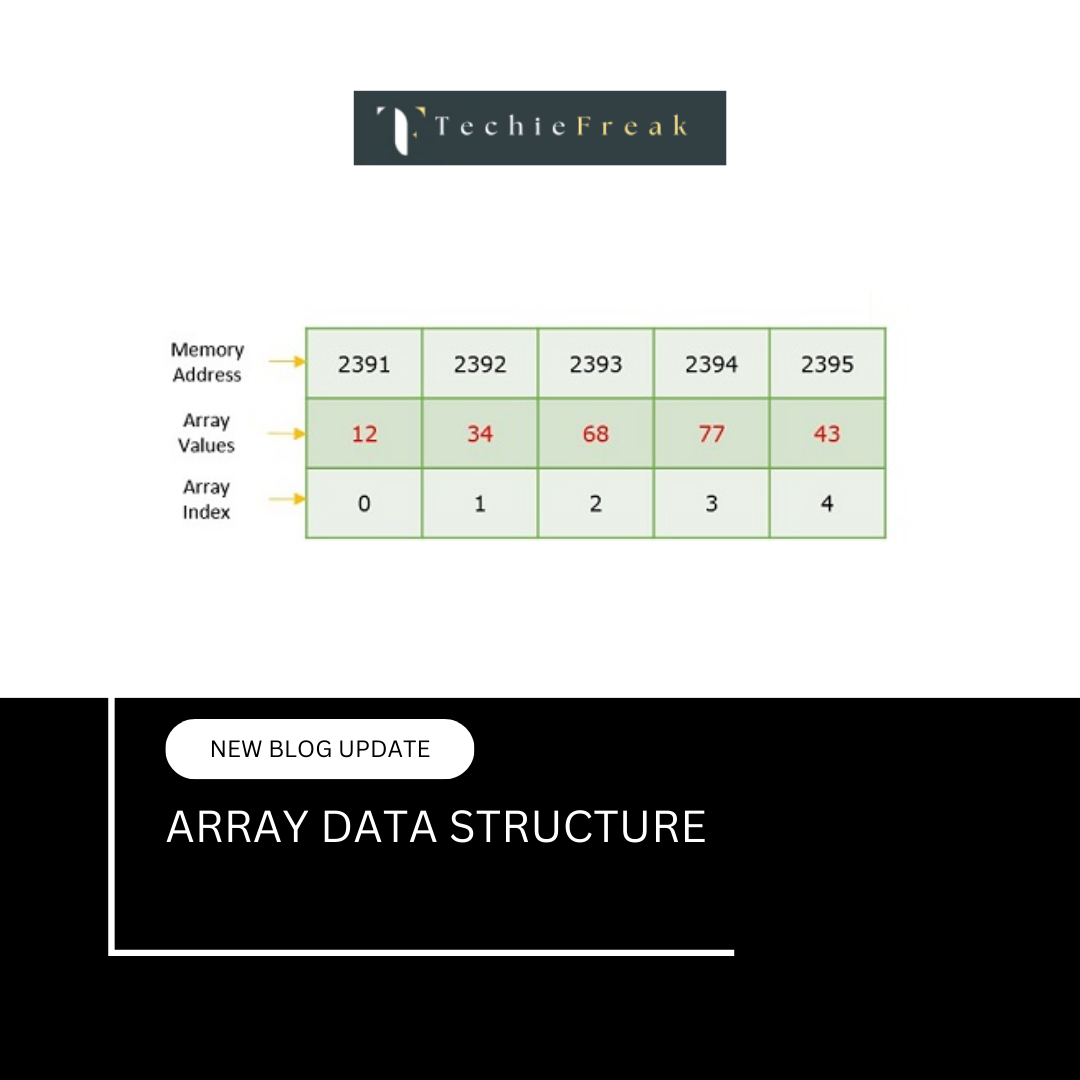
How It Works Internally
- The base address of the array is known.
- The memory address of the required element is calculated using:
Address = Base Address + (index × size of element)
- The value stored at that address is retrieved directly.
Time Complexity
O(1) — Constant Time
Why?
- The address calculation takes constant time.
- Access does not depend on array size.
- Accessing the first or last element takes the same time.
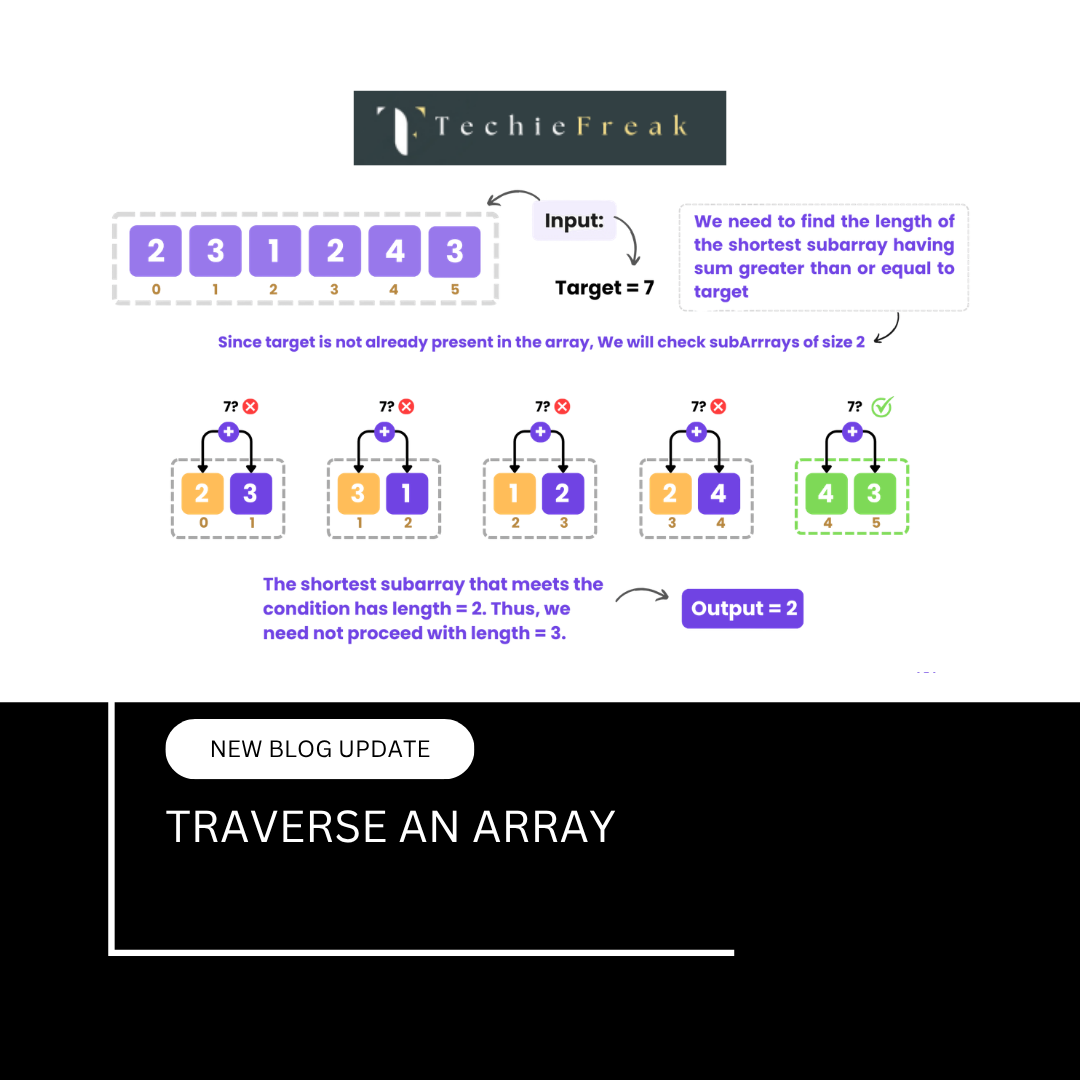
2. Traversing an Array
What Is Traversal?
Traversal means visiting each element of the array at least once to perform an operation.
Example
for i = 0 to n-1:
    process(arr[i])
Internal Behavior
- Elements are accessed sequentially
- The loop runs once for each element
Time Complexity
O(n)
Reason
- Every element must be visited
- Time grows linearly with array size
3. Insertion Operation in Arrays
Insertion means adding a new element at a specified position.
a) Insertion at the End
Case 1: Space Available
- Insert element at the last index
Time Complexity:
O(1) (Best Case)
Case 2: Array Full (Dynamic Arrays)
- New memory allocated
- Existing elements copied
Time Complexity:
O(n)
b) Insertion at the Beginning
Steps
- Shift all elements one position to the right
- Insert new element at index 0
Time Complexity:
O(n)
Reason:
All elements must be shifted.
c) Insertion at a Given Index
Steps
- Shift elements from the insertion index onward
- Insert the new element
Time Complexity:
O(n)
Reason:
Shifting elements is costly.
4. Deletion Operation in Arrays
Deletion means removing an element from a specified index.
a) Deletion from the End
Steps
- Remove last element
- Reduce size
Time Complexity:
O(1)
b) Deletion from the Beginning
Steps
- Remove element at index 0
- Shift remaining elements left
Time Complexity:
O(n)
c) Deletion from a Given Index
Steps
- Remove element
- Shift remaining elements to fill the gap
Time Complexity:
O(n)
5. Searching in Arrays
Searching means finding the index of a given element.
a) Linear Search
Used When
- Array is unsorted
Steps
- Compare each element with the target
Time Complexity
- Best Case: O(1)
- Worst Case: O(n)
b) Binary Search
Used When
- Array is sorted
Steps
- Divide the search space into halves repeatedly
Time Complexity
O(log n)
Note
Binary search is much faster but requires sorted data.
6. Updating Elements in an Array
What Is Updating?
Updating means changing the value at a specific index.
Example
arr[3] = 50;
Time Complexity
O(1)
Why?
- Direct address calculation
- No shifting or traversal needed
7. Sorting Arrays
What Is Sorting?
Sorting rearranges array elements into a specific order (ascending or descending).
Common Sorting Algorithms
| Algorithm | Time Complexity |
|---|---|
| Bubble Sort | O(n²) |
| Selection Sort | O(n²) |
| Insertion Sort | O(n²) |
| Merge Sort | O(n log n) |
| Quick Sort | O(n log n) (average) |
Why Sorting Matters
- Makes searching faster
- Improves data organization
- Required for binary search
Common Sorting Algorithms and Time Complexity
| Algorithm | Best | Average | Worst |
|---|---|---|---|
| Bubble Sort | O(n) | O(n²) | O(n²) |
| Selection Sort | O(n²) | O(n²) | O(n²) |
| Insertion Sort | O(n) | O(n²) | O(n²) |
| Merge Sort | O(n log n) | O(n log n) | O(n log n) |
| Quick Sort | O(n log n) | O(n log n) | O(n²) |
| Heap Sort | O(n log n) | O(n log n) | O(n log n) |
Sorting choice affects overall performance significantly.
8. Time Complexity Summary Table
| Operation | Time Complexity |
|---|---|
| Access | O(1) |
| Traverse | O(n) |
| Insert at End | O(1)* |
| Insert at Beginning | O(n) |
| Insert at Index | O(n) |
| Delete from End | O(1) |
| Delete from Beginning | O(n) |
| Delete from Index | O(n) |
| Linear Search | O(n) |
| Binary Search | O(log n) |
| Update | O(1) |
* Amortized O(1) for dynamic arrays
9. Space Complexity of Arrays
- Arrays require contiguous memory
- Static arrays allocate memory once
- Dynamic arrays may reallocate memory
Space Complexity:
- O(n)
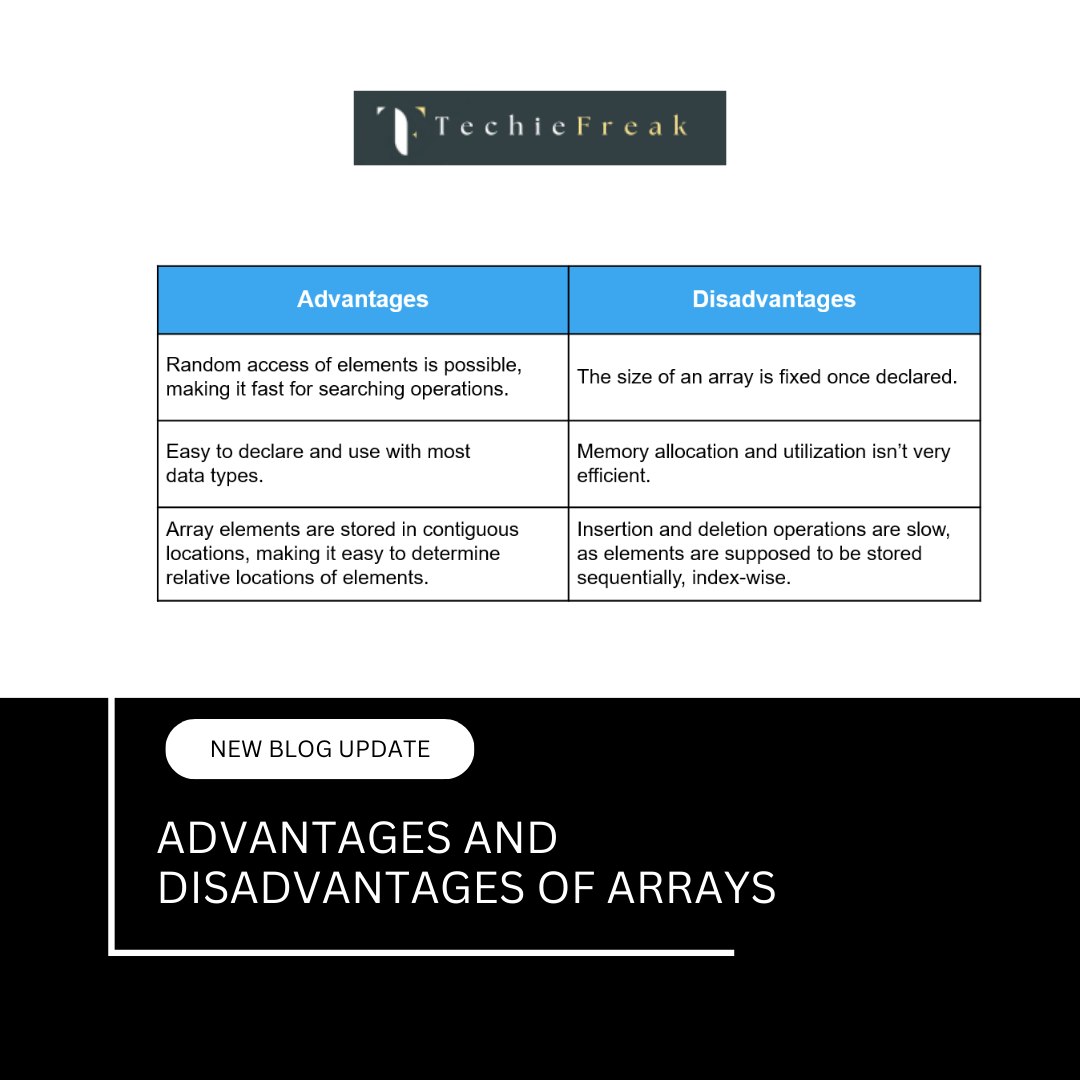
10. Why Insertions and Deletions Are Costly in Arrays
Because arrays store elements contiguously:
- Removing or adding an element breaks the sequence
- Shifting is required to maintain order
This limitation leads to:
- Linked lists for frequent insertions/deletions
- Dynamic arrays for flexible resizing
Relationship with Other Topics
This topic connects directly with:
- Array Memory Representation
- Advantages and Disadvantages of Arrays
- Searching and Sorting Algorithms
- Two Pointer and Sliding Window techniques
Next Topic:
Advantages and Disadvantages of Arrays
.png)
.png)
.png)
.png)
.png)
.png)
.png)
.png)
.png)
.png)
.png)
.png)
.png)
.png)
.png)
.png)
.png)
.png)
.png)
.png)
.png)
.png)
.png)
.png)
.png)
.png)
.png)
.png)
.png)
.png)
.png)
.png)
.png)
.png)
.png)
.png)
.png)
.png)
.png)
.png)
.png)
.png)
.png)
.png)
.png)
.png)
.png)
.png)
.png)
.png)
.png)
.png)
.png)
.png)
.png)
.png)
.png)
.png)
.png)
.png)
.png)
.png)
.png)
.png)
.png)
.png)
.png)
.png)
.png)
.png)
.png)
.png)
.png)
.png)
.png)
.png)
.png)
.png)
.png)
.png)
.png)
.png)
.png)
.png)
.png)
.png)
.png)
.png)
.png)
.png)
.png)
.png)
.png)
.png)
.png)
.png)
.png)
.png)
.png)
.png)
.png)
.jpg)
.png)
.jpg)
.jpg)
.png)
