.png)
JavaScript Arrays –
Introduction to JavaScript Arrays
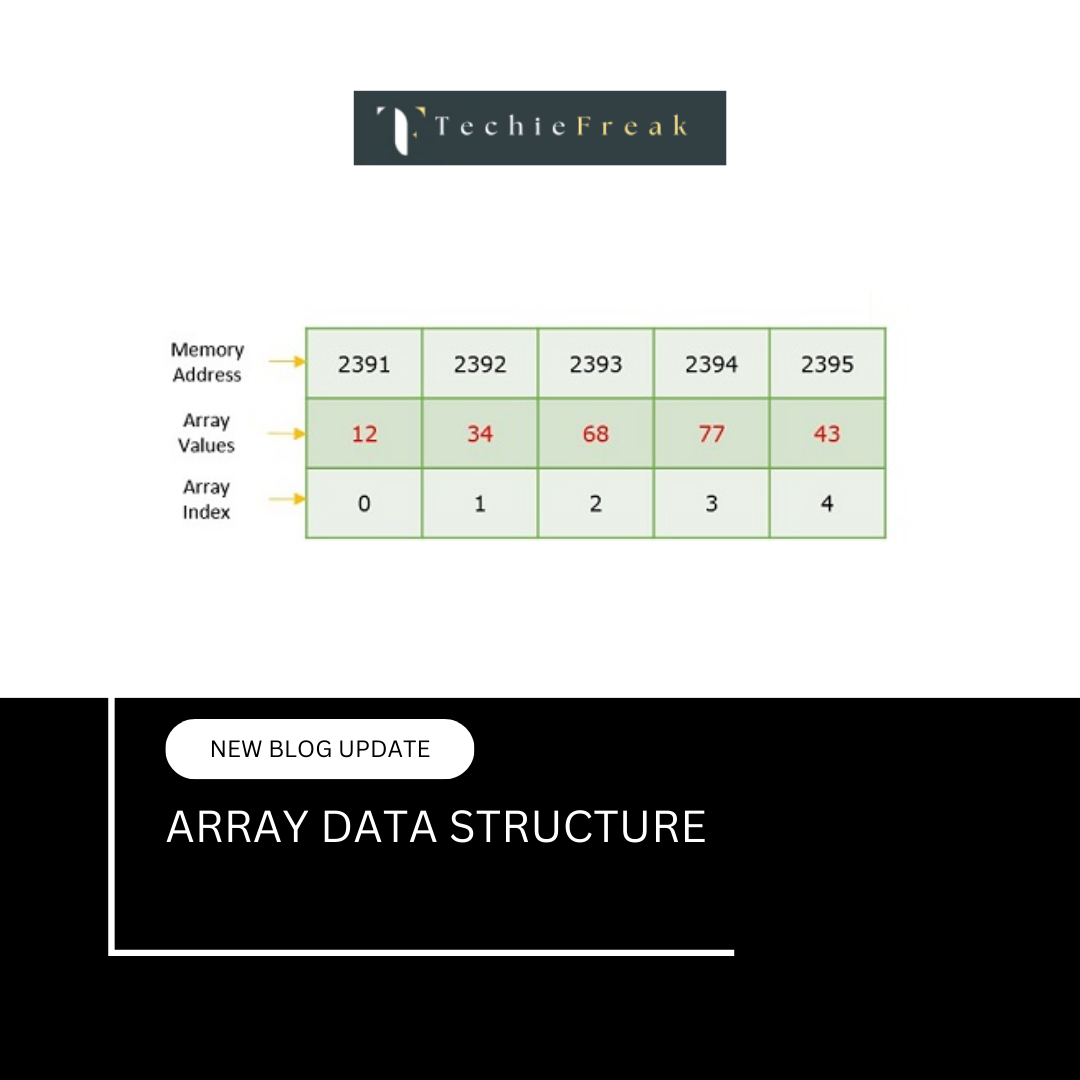
In JavaScript, an array is a built-in data structure used to store multiple values in a single variable. Instead of declaring separate variables for each value, arrays allow developers to organize related data together in an ordered collection.
Arrays are indexed, meaning every element is stored at a specific numeric position called an index. JavaScript arrays follow zero-based indexing, where the first element is stored at index 0, the second at index 1, and so on.
Arrays in JavaScript are dynamic, which means:
- Their size can change at runtime
- Elements can be added or removed at any time
- Different data types can coexist in the same array
Because of their flexibility and efficiency, arrays are one of the most commonly used data structures in JavaScript programming.
Why Arrays Are Important in JavaScript
Without arrays, managing large amounts of data becomes inefficient and error-prone. For example, storing multiple car names in separate variables does not scale well when the dataset grows.
Arrays solve this problem by:
- Reducing code repetition
- Enabling easy iteration using loops
- Improving readability and maintainability
- Supporting powerful built-in methods for data manipulation
Arrays are widely used in:
- Web development
- Data processing
- APIs and JSON handling
- Frameworks like React, Angular, and Vue
Creating Arrays in JavaScript
Creating an Array Using Literal Syntax
The array literal syntax is the most common and recommended way to create arrays in JavaScript. It uses square brackets [] to define array elements.
// Empty array
let a = [];

// Array with initial values
let b = [10, 20, 30];
This method is preferred because it is:
- More readable
- Less error-prone
- Faster than constructor-based creation
- Considered best practice by JavaScript standards
Creating an Array Using the Array Constructor
JavaScript also provides the Array constructor to create arrays.
let a = new Array(10, 20, 30);
While this method works similarly to array literals, it can lead to confusion when only a single numeric argument is passed. Therefore, it is generally not recommended for beginners.
Understanding Array Indexing
Each element in a JavaScript array is associated with a numeric index. Indexing starts at 0, not 1.
let technologies = ["HTML", "CSS", "JavaScript"];
Index positions:
- "HTML" → index 0
- "CSS" → index 1
- "JavaScript" → index 2
Accessing elements using incorrect indexes results in undefined.
Accessing Elements of an Array
Array elements are accessed using square brackets and their index number.
console.log(technologies[0]);
console.log(technologies[1]);
This allows direct and fast access to any element in the array.
Accessing the First Element of an Array
Since indexing starts from 0, the first element of an array is always located at index 0.
let firstElement = technologies[0];
This approach works for all arrays regardless of their size.
Accessing the Last Element of an Array
To access the last element, JavaScript provides the length property.
let lastElement = technologies[technologies.length - 1];
This method ensures correctness even when the array size changes dynamically.
Modifying Elements in an Array
JavaScript arrays are mutable, meaning their elements can be modified after creation.
let tech = ["HTML", "CSS", "JS"];
tech[1] = "Bootstrap";
The value at index 1 is replaced without affecting other elements.
Adding Elements to an Array
JavaScript provides built-in methods to add elements efficiently.
push() Method
Adds one or more elements to the end of an array.
tech.push("Node.js");
unshift() Method
Adds one or more elements to the beginning of an array.
tech.unshift("Web Development");
Both methods automatically update the array length.
Removing Elements from an Array
pop() Method
Removes and returns the last element of the array.
tech.pop();
shift() Method
Removes and returns the first element of the array.
tech.shift();
splice() Method
Removes, replaces, or inserts elements at any position.
tech.splice(1, 2);
The splice() method directly modifies the original array and is very powerful.
Array Length Property
The length property returns the total number of elements in an array.
let length = tech.length;
This property is dynamic and updates automatically when elements are added or removed.
Increasing and Decreasing Array Length
JavaScript allows manual modification of the array length.
tech.length = 6;
Increasing length creates empty slots.
tech.length = 2;
Decreasing length permanently removes elements from the end of the array.
Iterating Through Array Elements
Iteration is the process of accessing each element one by one.
Using for Loop
for (let i = 0; i < tech.length; i++) {
  console.log(tech[i]);
}
This method provides full control over the iteration process.
Using forEach() Method
tech.forEach(function(item) {
  console.log(item);
});
The forEach() method is cleaner and commonly used in modern JavaScript applications.
Concatenating Arrays
The concat() method combines two or more arrays into a new array.
let fullStack = frontend.concat(backend);
The original arrays remain unchanged.
Converting an Array to a String
The toString() method converts array elements into a comma-separated string.
let result = tech.toString();
This is useful for display purposes but not recommended for data processing.
Checking the Type of an Array
Using typeof on an array returns "object", which is not specific enough.
typeof tech;
Recognizing a JavaScript Array
Using Array.isArray()
Array.isArray(tech);
This is the most reliable and recommended method.
Using instanceof Operator
tech instanceof Array;
This method also works but is less preferred than Array.isArray().
Important Difference Between Array Literal and Constructor
const a1 = [5];
const a2 = new Array(5);
Results:
- [5] creates an array with one element
- new Array(5) creates an empty array with length 5
Understanding this distinction is important for interviews and real-world debugging.
Key Concepts Summary
- JavaScript arrays are ordered, indexed, and dynamic
- Arrays can store multiple data types
- Array literals are preferred over constructors
- Built-in methods simplify data manipulation
- Proper array handling improves performance and code quality
.png)
.png)
.png)
.png)
.png)
.png)
.png)
.png)
.png)
.png)
.png)
.png)
.png)
.png)
.png)
.png)
.png)
.png)
.png)
.png)
.png)
.png)
.png)
.png)
.png)
.png)
.png)
.png)
.png)
.png)
.png)
.png)
.png)
.png)
.png)
.png)
.png)
.png)
.png)
.png)
.png)
.png)
.png)
.png)
.png)
.png)
.png)
.png)
.png)
.png)
.png)
.png)
.png)
.png)
.png)
.png)
.png)
.png)
.png)
.png)
.png)
.png)
.png)
.png)
.png)
.png)
.png)
.png)
.png)
.png)
.png)
.png)
.png)
.png)
.png)
.png)
.png)
.png)
.png)
.png)
.png)
.png)
.png)
.png)
.png)
.png)
.png)
.png)
.png)
.png)
.png)
.png)
.png)
.png)
.png)
.png)
.png)
.png)
.png)
.png)
.png)
.jpg)
.png)
.jpg)
.jpg)
.png)
