.png)
UNIT TESTING IN PYTHON
What Is Unit Testing?
Unit testing is a disciplined software development practice where individual components of a program—known as units—are tested in isolation. A “unit” can be a function, method, or class whose behavior must be verified independently from the rest of the system.
The purpose of unit testing is to confirm that each part of the code performs exactly what it is intended to do. This verification is done by providing controlled inputs and checking whether the outputs match expected results. By isolating small units of functionality, developers can detect defects early, ensure correctness, and guarantee that changes do not break existing behavior.
Unit testing is the foundation of high-quality software because it creates a reliable safety net. When code evolves—whether through refactoring, optimization, or feature addition—unit tests ensure that previously working features remain stable.
Key Characteristics of Unit Testing:
- Isolation
Each test must focus on a single behavior. External systems like databases, APIs, files, or network logic should be mocked or stubbed. - Repeatability
Tests must produce identical results every time, regardless of environment or execution order. - Independence
Tests cannot depend on each other. One failing test must not affect the next. - Automation
Unit tests are automated and can run quickly during development, commits, or CI/CD pipelines. - Fast Execution
Good unit tests run in milliseconds. Slow tests belong to integration testing.
Why Unit Testing Matters
- Ensures correctness
- Reduces bugs in production
- Makes code maintainable
- Allows safe refactoring
- Encourages modular design
- Helps understand system behavior
- Improves developer confidence
Unit testing is not optional in professional environments; it is an essential part of software engineering.
A Simple Example of a Unit
Suppose we have a simple function:
def add(a, b):
    return a + b
Testing this small piece of logic is considered a unit test because we verify only this behavior, independent of any external dependency.
Benefits of Unit Testing
Unit testing delivers several long-term advantages:
Early Bug Detection
Testing small, isolated components allows developers to spot defects before they spread into larger systems. Fixing a bug early costs significantly less time and money.
Improved Code Design
To write testable code, developers naturally create smaller, cleaner, and more modular functions. This makes code easier to maintain.
Safe Refactoring
Unit tests act like a safety net. When you modify code, tests confirm that existing behavior remains consistent.
Documentation of Behavior
Tests themselves become documentation. When someone new joins the team, they understand system behavior by reading the tests.
Faster Development
Although writing tests initially requires time, it reduces debugging time in the long run.
Facilitates Continuous Integration
Modern CI/CD pipelines rely heavily on automated test suites. Unit tests ensure code quality before deployment.
Demonstration of Refactoring Safety
Original code:
def multiply(a, b):
    return a * b
Refactored code:
def multiply(a, b):
    result = a * b
    return result
If tests exist, we instantly confirm behavior is unchanged.
The unit test Framework
unit test is Python’s built-in testing framework. It is inspired by Java’s JUnit and follows the xUnit architecture pattern. It includes a rich set of tools for writing, organizing, and running tests.
Core Concepts of unit test:
- Test Cases
A test case represents a single unit of testing. It is created by subclassing unit test.TestCase. - Test Suite
A collection of test cases. - Test Runner
Executes tests and reports results. - Assertions
Assertions validate behavior. If an assertion fails, the test fails.
Common Assertion Methods:
- assertEqual(a, b)
- assertNotEqual(a, b)
- assertTrue(x)
- assertFalse(x)
- assertIsNone(x)
- assertRaises(Exception)
Test Discovery
Unit test automatically discovers tests in files named:
- test_*.py
- *_test.py
What Makes unit test Important?
- Comes with Python (no installation needed)
- Highly structured and stable
- Supports setup/teardown methods
- Integrates well with CI/CD
Writing Tests Using unit test
Code to test (math_functions.py):
def add(a, b):
    return a + b

def divide(a, b):
    return a / b
Unit test (test_math.py):
import unittest
from math_functions import add, divide

class TestMathFunctions(unittest.TestCase):

    def test_add(self):
        self.assertEqual(add(2, 3), 5)

    def test_divide(self):
        self.assertEqual(divide(10, 2), 5)

    def test_divide_by_zero(self):
        with self.assertRaises(ZeroDivisionError):
            divide(10, 0)

if __name__ == "__main__":
    unittest.main()
Run it:
python test_math.py
Test Structure: Setup & Teardown
Complex functions often require reusable states. unit test provides lifecycle methods:
setUp()
Runs before every test case. Useful for:
- Setting initial variables
- Connecting mock databases
- Preparing test objects
tearDown()
Runs after every test. Used to clean up resources.
setUpClass() / tearDownClass()
Runs once per class. Ideal for:
- Loading large data
- Establishing database connections
Using Setup and Teardown
import unittest

class TestExample(unittest.TestCase):

    def setUp(self):
        self.data = [1, 2, 3]

    def tearDown(self):
        self.data = None

    def test_sum(self):
        self.assertEqual(sum(self.data), 6)
The pytest Framework
While unit test is built-in, pytest is the most popular third-party testing framework. Its philosophy is simplicity and power.
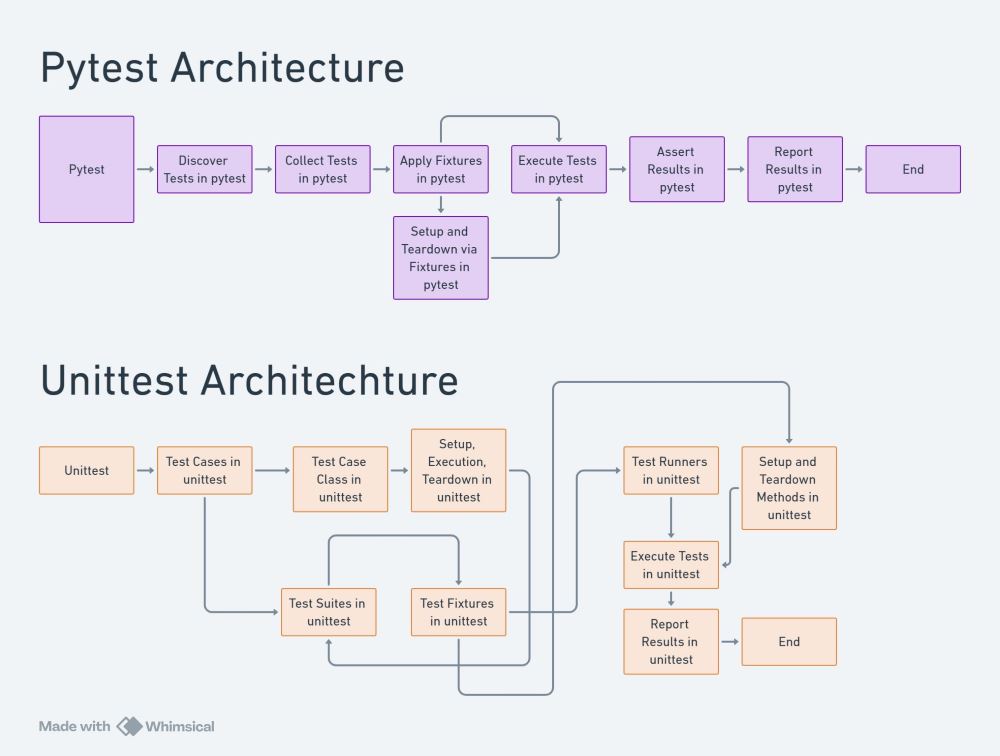
Reasons pytest is widely preferred:
- No need for classes
- Cleaner syntax
- Detailed error reporting
- Built-in fixtures
- Plug-in ecosystem
- Supports parametrized tests
- Better integration with modern Python apps
What Makes pytest Unique?
- Uses Python functions instead of classes
- Less boilerplate
- Extremely flexible
- Integrates with coverage, hypothesis, tox, CI/CD
Writing a Basic pytest Test
Code to test:
def subtract(a, b):
    return a - b
pytest test:
from mymodule import subtract

def test_subtract():
    assert subtract(5, 3) == 2
Run:
pytest
Assertions in Unit Testing
Assertions are the heart of unit testing. They define expectations.
Essential Types of Assertions:
- Equality Assertions
Verifies exact values. - Truth Assertions
Validates boolean conditions. - Exception Assertions
Ensures the code raises expected exceptions. - Membership Assertions
Checks whether an element is inside a container. - Regex Assertions
Validates text formats.
Assertions clearly define what correct behavior should look like.
Assertion Demonstrations
self.assertEqual(2+2, 4)
self.assertTrue(5 > 3)
self.assertIn("a", "cat")
self.assertRaises(ValueError, int, "abc")
Mocking & Patching
Many functions depend on external systems:
- APIs
- Databases
- Files
- Time functions
- Random values
- System states
Testing such functions directly would make tests slow and unreliable.
Mocking replaces external dependencies with simulated versions.
Patching temporarily replaces objects during testing.
Python provides the unit test.mock module for this.
Why Mocks Are Critical:
- Avoid real network calls
- Avoid modifying real files
- Force deterministic behavior
- Simulate API failures
- Test logic without external resources
Mocking an API Call
Code:
import requests

def get_status(url):
    r = requests.get(url)
    return r.status_code
Test:
from unittest.mock import patch, MagicMock
import unittest
from app import get_status

class TestAPI(unittest.TestCase):

    @patch("app.requests.get")
    def test_status(self, mock_get):
        mock_response = MagicMock()
        mock_response.status_code = 200
        mock_get.return_value = mock_response

        self.assertEqual(get_status("http://fake.com"), 200)
Parameterized Tests
Parameterized tests help reduce duplication.
Instead of writing:
test_add_1
test_add_2
test_add_3
You can loop through input combinations.
pytest supports this natively.
Using pytest Parameters
import pytest
from app import multiply

@pytest.mark.parametrize("a, b, expected", [
    (2, 3, 6),
    (1, 10, 10),
    (0, 5, 0),
])
def test_multiply(a, b, expected):
    assert multiply(a, b) == expected
Test Coverage
Coverage measures how much of your code is tested.
Types of coverage:
- Statement coverage
- Branch coverage
- Function coverage
- Line coverage
Coverage ensures:
- No untested logic
- All paths are validated
- Codebase is robust
Python tool: coverage.py
Running Coverage
coverage run -m pytest
coverage report
coverage html
Test Organization & Folder Structure
A professional test suite has a well-defined structure:
project/
    app/
        module1.py
        module2.py
    tests/
        test_module1.py
        test_module2.py
    requirements.txt
Benefits:
- Cleaner code
- Easier navigation
- Supports automatic test discovery
Creating a Folder Structure
mkdir tests
touch tests/test_users.py
Test-Driven Development
Test-Driven Development (TDD) flips traditional development:
TDD Cycle: RED → GREEN → REFACTOR
- Write a failing test (RED)
- Write minimum code to pass (GREEN)
- Refactor code while tests stay green (REFACTOR)
Advantages:
- Forces clarity
- Improves design
- Ensures full coverage
DD Example
Step 1: Write failing test:
def test_square():
    assert square(3) == 9
Step 2: Implement minimal solution:
def square(x):
    return x*x
Fixtures
Fixtures prepare test environments:
- Heavy data
- Database connections
- Sample objects
- Mock states
pytest fixtures simplify test setup.
pytest Fixture
import pytest

@pytest.fixture
def sample_list():
    return [1, 2, 3]

def test_sum(sample_list):
    assert sum(sample_list) == 6
Testing Exceptions & Edge Cases
Good test suites go beyond normal behavior.
Edge cases include:
- Empty inputs
- Null values
- Invalid types
- Boundary values
- Extreme sizes
Testing exceptions ensures reliability.
PRACTICAL
with self.assertRaises(TypeError):
    add("a", 1)
CI/CD Integration
Automated testing is essential in pipelines:
Tools:
- GitHub Actions
- GitLab CI
- Jenkins
- CircleCI
Benefits:
- Prevent broken code from merging
- Automates quality checks
- Supports continuous delivery
GitHub Actions Example
name: Python Tests

on: [push]

jobs:
  build:
    runs-on: ubuntu-latest
    steps:
      - uses: actions/checkout@v3
      - uses: actions/setup-python@v4
        with:
          python-version: '3.10'
      - run: pip install -r requirements.txt
      - run: pytest
Writing Maintainable Tests
Good tests must be:
- Clear
- Isolated
- Fast
- Deterministic
- Independent
- Focused
- Documented
Avoid:
- Over-mocking
- Testing trivial code
- Duplicated tests
Bad vs Good Test
Bad:
assert add(1,2) == 3 # no structure
Good:
def test_add_positive_numbers():
    assert add(1,2) == 3
Frequently Asked Questions (FAQ)
1. Is unit testing really necessary for small Python projects?
Yes. Even small projects benefit from unit testing. It helps catch logical errors early, makes future changes safer, and builds good development habits. Many production bugs come from “small” code that was never tested.
2. Should I use unittest or pytest?
Both are excellent.
- Use unittest if you want a built-in, structured, and traditional approach.
- Use pytest if you prefer cleaner syntax, faster writing, powerful fixtures, and modern tooling.
In professional environments, pytest is more commonly used, but understanding unittest is essential.
3. What is the difference between unit testing and integration testing?
- Unit testing checks individual functions or classes in isolation.
- Integration testing verifies how multiple components work together (database, API, services).
Unit tests are fast and isolated; integration tests are slower and broader.
4. How much test coverage is considered good?
There is no universal number, but:
- 70–80% is generally acceptable
- 90%+ is excellent for critical systems
However, quality matters more than numbers. Meaningful tests are better than high but shallow coverage.
5. Should I test everything?
No.
Avoid testing:
- Trivial one-line getters/setters
- Third-party libraries
- Framework internals
Focus on:
- Business logic
- Edge cases
- Error handling
- Critical workflows
Final Takeaway
Unit testing is not just about finding bugs—it is about building confidence in your code. A well-tested codebase is easier to maintain, safer to refactor, and far more reliable in production. Whether you use unittest or pytest, strong testing practices are a non-negotiable skill for professional Python developers.
.png)
.png)
.png)
.png)
.png)
.png)
.png)
.png)
.png)
.png)
.png)
.png)
.png)
.png)
.png)
.png)
.png)
.png)
.png)
.png)
.png)
.png)
