SQL Databases in Python
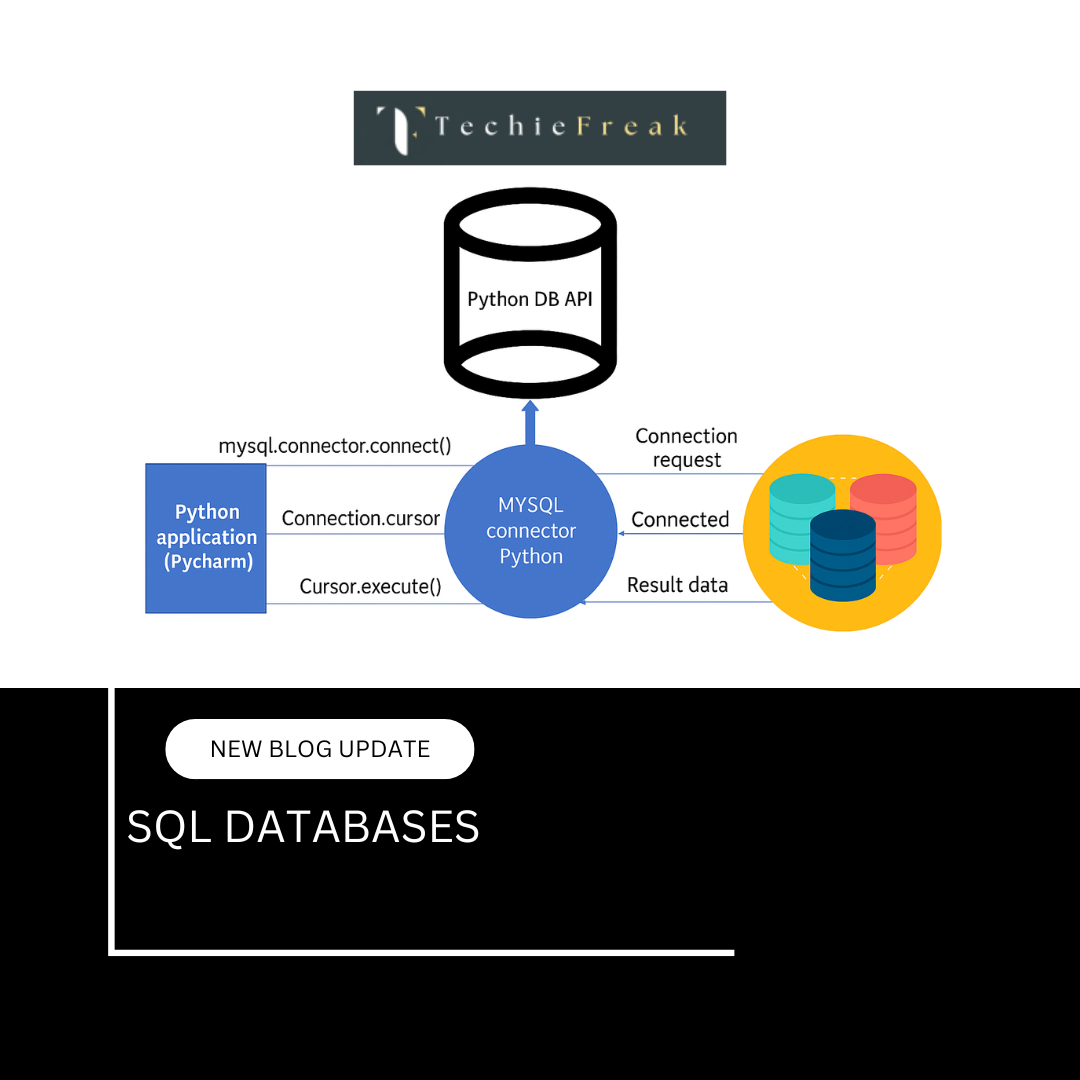
Database API (PEP 249) — The Universal Standard
What is PEP 249?
PEP 249 (Python Enhancement Proposal 249) defines the
Python Database API Specification v2.0.
It provides a standard interface for how Python programs interact with SQL databases, regardless of the database engine.
Because of PEP 249:
- SQLite
- MySQL
- PostgreSQL
- Oracle
all follow nearly the same programming structure.
This ensures portability, consistency, and safety.
Core Components of PEP 249
A. Connection Object
What is a Connection Object?
A connection object represents an active link between your Python program and the database.
It is responsible for:
- Establishing the database session
- Managing transactions
- Committing or rolling back changes
- Closing the connection safely
Creating a Connection
conn = driver.connect(
    host="localhost",
    user="user",
    password="pass",
    database="db"
)
Different drivers use different parameters, but the concept remains the same.
Key Connection Methods
| Method | Purpose |
|---|---|
| commit() | Saves changes permanently |
| rollback() | Reverts uncommitted changes |
| close() | Closes the database connection |
| cursor() | Creates a cursor object |
Example
conn.commit()    # Save changes
conn.rollback()  # Undo changes
conn.close()     # Release resources
Why Connection Matters?
- Controls transactions
- Prevents data corruption
- Ensures resource management
- Needed for multi-user environments
B. Cursor Object
What is a Cursor?
A cursor is used to:
- Execute SQL queries
- Fetch query results
- Navigate through returned records
Think of a cursor as a pointer moving through database results.
Creating a Cursor
cursor = conn.cursor()
Key Cursor Methods
| Method | Description |
|---|---|
| execute() | Executes one SQL statement |
| executemany() | Executes query multiple times |
| fetchone() | Returns one row |
| fetchmany(n) | Returns n rows |
| fetchall() | Returns all rows |
| close() | Closes the cursor |
Example
cursor.execute("SELECT * FROM users")
rows = cursor.fetchall()
Why Cursor Matters
- Separates query execution from connection
- Allows efficient row-by-row processing
- Enables multiple queries using the same connection
C. Executing SQL Statements
execute()
Used to run:
- SELECT
- INSERT
- UPDATE
- DELETE
- CREATE TABLE
cursor.execute("SELECT * FROM users")
executemany()
Used when inserting or updating multiple rows efficiently.
data = [
    ("Alice", "a@x.com"),
    ("Bob", "b@x.com")
]

cursor.executemany(
    "INSERT INTO users (name, email) VALUES (%s, %s)",
    data
)
Why This Matters
- Faster bulk operations
- Cleaner code
- Reduced database calls
D. Fetching Data
fetchone()
Returns one record at a time.
row = cursor.fetchone()
Best for:
- Large datasets
- Streaming results
fetchall()
Returns all records at once.
rows = cursor.fetchall()
Best for:
- Small result sets
fetchmany(size)
rows = cursor.fetchmany(10)
Fetches a limited number of rows.
Important Note
Once fetched, rows are consumed — you cannot fetch them again unless the query is re-executed.
E. Transactions: Commit & Rollback
What is a Transaction?
A transaction is a group of SQL operations treated as one unit.
commit()
conn.commit()
- Saves all changes since last commit
- Makes changes permanent
rollback()
conn.rollback()
- Reverts all uncommitted changes
- Used during errors or exceptions
Example with Error Handling
try:
    cursor.execute("INSERT INTO users VALUES (...)")
    conn.commit()
except Exception:
    conn.rollback()
Why Transactions Matter
- Maintains data consistency
- Prevents partial updates
- Critical in financial and business systems
F. Parameterized Queries (SQL Injection Protection)
What is SQL Injection?
A security attack where malicious SQL code is injected via user input.
Unsafe Query ❌
query = f"SELECT * FROM users WHERE id = {user_id}"
cursor.execute(query)
Safe Query (PEP 249 Style) ✅
cursor.execute(
    "SELECT * FROM users WHERE id = %s",
    (user_id,)
)
Benefits
- Prevents SQL injection
- Automatically escapes data
- Improves performance (query reuse)
G. Error Handling (PEP 249 Exceptions)
PEP 249 defines a standard exception hierarchy.
| Exception | Meaning |
|---|---|
| Error | Base exception |
| InterfaceError | Driver-related error |
| DatabaseError | Database-related error |
| OperationalError | Connection issues |
| IntegrityError | Constraint violation |
| ProgrammingError | SQL syntax error |
| DataError | Invalid data |
| NotSupportedError | Unsupported feature |
Example
try:
    cursor.execute("INSERT INTO users VALUES (...)")
except sqlite3.IntegrityError:
    print("Duplicate entry")
Why PEP 249 is Important
✔ Uniform API across databases
✔ Easy migration between SQL engines
✔ Secure and structured database access
✔ Cleaner, maintainable code
✔ Industry-standard practice
SQLite — Embedded SQL Database in Python
SQLite is a lightweight, file-based SQL database that comes built-in with Python via the sqlite3 module.
- No server required
- Stores data in a single .db file
- Ideal for small-scale applications
Connecting to SQLite
import sqlite3

conn = sqlite3.connect("mydata.db")
cursor = conn.cursor()
Creating a Table
cursor.execute("""
CREATE TABLE IF NOT EXISTS users (
    id INTEGER PRIMARY KEY AUTOINCREMENT,
    name TEXT NOT NULL,
    email TEXT UNIQUE
)
""")
conn.commit()
Inserting Data
cursor.execute(
    "INSERT INTO users (name, email) VALUES (?, ?)",
    ("Alice", "a@x.com")
)
conn.commit()
Querying Data
cursor.execute("SELECT id, name, email FROM users")
for row in cursor.fetchall():
    print(row)
Updating Data
cursor.execute(
    "UPDATE users SET name = ? WHERE id = ?",
    ("New Name", 1)
)
conn.commit()
Deleting Data
cursor.execute("DELETE FROM users WHERE id = ?", (1,))
conn.commit()
When to Use SQLite
Best suited for:
- Small applications
- Prototypes
- Offline desktop tools
- Embedded systems
- Data analysis scripts
Not recommended for:
- High-concurrency systems
- Large-scale production traffic
MySQL with Python
MySQL is a widely used relational database commonly found in web and enterprise applications.
Popular Python Libraries
- mysql-connector-python
- PyMySQL
- SQLAlchemy (ORM)
Connecting to MySQL
import mysql.connector

conn = mysql.connector.connect(
    host="localhost",
    user="root",
    password="password",
    database="shop"
)
cursor = conn.cursor()
Creating a Table
cursor.execute("""
CREATE TABLE products (
    id INT PRIMARY KEY AUTO_INCREMENT,
    name VARCHAR(100),
    price DECIMAL(10, 2)
)
""")
conn.commit()
Querying Data
cursor.execute("SELECT * FROM products")
rows = cursor.fetchall()
Prepared Statements (SQL Injection Protection)
cursor.execute(
    "SELECT * FROM products WHERE name = %s",
    (product_name,)
)
When to Use MySQL
- E-commerce platforms
- Web applications
- CMS systems
- Financial and business applications
- Medium to large projects
PostgreSQL with Python
PostgreSQL is an advanced, enterprise-grade SQL database known for reliability and performance.
Key Strengths
- Strong ACID compliance
- High concurrency (MVCC)
- Advanced indexing
- JSON and array support
- Excellent scalability
Python Libraries
- psycopg2
- psycopg3
- SQLAlchemy
- Django ORM
Connecting to PostgreSQL
import psycopg2

conn = psycopg2.connect(
    host="localhost",
    dbname="testdb",
    user="postgres",
    password="password"
)
cursor = conn.cursor()
PostgreSQL Advantages
- MVCC for better concurrency
- Advanced data types (JSONB, arrays, HSTORE)
- Built-in full-text search
- Strong data integrity
- High performance under load
JSONB Example
Create table:
cursor.execute("""
CREATE TABLE events (
    id SERIAL PRIMARY KEY,
    data JSONB
)
""")
conn.commit()
Insert JSON data:
cursor.execute(
    "INSERT INTO events (data) VALUES (%s)",
    ({"type": "login", "user": "Alice"},)
)
conn.commit()
Summary
- PEP 249 provides a unified database interface in Python
- SQLite is ideal for lightweight, embedded use cases
- MySQL works well for web and transactional systems
- PostgreSQL is best for advanced, high-performance applications
.png)
.png)
.png)
.png)
.png)
.png)
.png)
.png)
.png)
.png)
.png)
.png)
.png)
.png)
.png)
.png)
.png)
.png)
.png)
.png)
.png)
.png)
.png)
