
Tool for Data Analysis and Visualization: Orange Data Mining
Orange is an open-source data visualization and data analysis toolkit for both novice and expert users. Built on Python, Orange features a user-friendly visual programming interface that enables users to design workflows for data mining, machine learning, and statistical analysis. It’s especially well-suited for educational use and quick prototyping due to its simplicity and modular node-based system.
Introduction to Orange
Developed by the Bioinformatics Laboratory at the University of Ljubljana, Orange is primarily used for interactive data exploration, model evaluation, and visualization. It provides components for reading data, preprocessing, modeling, evaluation, and visualization. Users can create workflows by dragging and connecting widgets (Orange’s version of nodes) on a canvas, forming pipelines without writing code.
Orange also supports scripting in Python for users who prefer coding and want to extend its capabilities beyond the GUI.
Key Components of Orange
- Orange Canvas
- The graphical workflow builder where users can drag and drop widgets to create data analysis pipelines.
- Widgets
- Modular blocks representing operations like data import, visualization, model training, or evaluation.
- Add-ons
- Orange supports domain-specific add-ons (Text Mining, Image Analytics, Bioinformatics, Time Series, etc.) that enhance its functionality.
- Python Scripting Support
- Users can interact with the Orange data structures using Python, allowing hybrid workflows combining GUI and code.
Architecture of Orange
Orange is built using Python and PyQt for the GUI. Its core architecture revolves around workflows made from widgets:
- Widgets: Independent modules that perform tasks like data import, preprocessing, classification, or visualization.
- Signals: Connections between widgets that transfer data or models from one widget to another.
- Workflow: A canvas-based graph where widgets are nodes and signals are edges.
This modular design makes Orange highly extensible and user-friendly.
Core Functionalities
1. Data Access
- Load datasets from:
- CSV, Excel, SQL databases
- Preloaded sample datasets (Iris, Titanic, Heart Disease)
2. Data Preprocessing
- Widgets for:
- Imputation of missing values
- Normalization and scaling
- Feature selection and transformation
- Row/column filtering
3. Machine Learning
- Built-in widgets for:
- Classification: Logistic Regression, Random Forest, Naive Bayes
- Regression: Linear Regression, SVR
- Clustering: k-Means, Hierarchical
- Model evaluation: Cross-validation, ROC, Confusion Matrix
4. Data Visualization
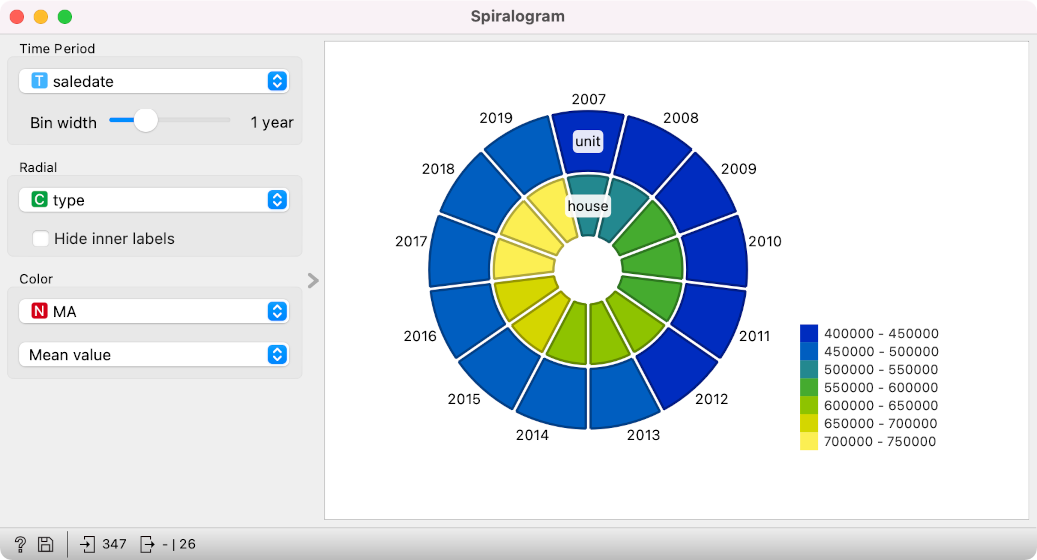
- Interactive visual widgets like:
Scatter plot, Box plot, Distributions
Scatter Plot- A scatter plot displays the relationship between two numerical variables. Each point represents an observation. This type of plot is ideal for identifying patterns, correlations, or outliers in data.Example: Plotting “Age” against “Income” to see if there’s a trend or cluster among customer segments.
Box Plot- A box plot (or box-and-whisker plot) shows the distribution of a dataset, including the median, quartiles, and potential outliers. It helps in understanding the spread and skewness of data.
Example: Comparing the sales distributions of different regions in a single visual.
Distributions- Distribution plots (such as histograms or density plots) show how values are spread across a range. These are useful for checking normality, spotting peaks, or identifying gaps in the data.
Example: Visualizing the frequency of customer purchase amounts or transaction sizes.
Heatmaps- A heatmap represents values in a matrix format where color intensity indicates the magnitude of a value. This is commonly used to visualize correlations or patterns in large datasets.
Example: Correlation heatmap of variables in a dataset to detect multicollinearity.
Line Plots- Line plots are used to visualize trends over a continuous variable, typically time. This helps to identify seasonality, spikes, or steady growth in data.
Example: Tracking monthly website traffic or stock price changes over a year.
Decision Trees- A decision tree is a tree-like model that displays how decisions or predictions are made based on data features. It’s a visual output of decision-based classification or regression tasks.
Example: A tree showing how customer attributes (age, region, purchase history) lead to predicting customer churn.
Dendrograms- Dendrograms are tree-like diagrams used to represent the hierarchical relationships between items, commonly used in cluster analysis. They help visualize how data points group together based on similarity.
Example: Grouping customer profiles based on demographics and purchase behavior.
5. Add-on Support
- Orange has a variety of domain-specific add-ons:
- Text Mining: For text preprocessing, embedding, topic modeling
- Image Analytics: Deep learning for image classification
- Time Series: Forecasting, decomposition, trend analysis
- Bioinformatics: Gene expression analysis
Advantages of Orange
- Ease of Use: Drag-and-drop interface ideal for beginners.
- Interactive Learning: Useful for teaching data science concepts.
- Python Integration: Extend workflows through code.
- Open-Source: Free to use and modify.
- Wide Range of Widgets: Covers almost all common ML/DS tasks.
- Modular Design: Add-ons available for different domains.
Limitations of Orange
- Scalability: Not designed for big data processing or distributed computing.
- Customization Limits in GUI: Less flexible than scripting tools for advanced customization.
- Basic Visual Styling: Limited styling options compared to tools like Tableau or Power BI.
- Dependency on Add-ons: Many advanced features require add-ons.
Use Cases
- Education
Professors and educators use Orange to teach students the basics of machine learning and data analysis without requiring coding skills. Students can visually experiment with regression, clustering, and evaluation techniques.
- Healthcare
Hospitals use Orange for disease prediction, analyzing patient history, and identifying health trends through classification and regression models.
- Retail and E-commerce
Retailers segment customers based on purchasing patterns, identify high-value clients, and track seasonal trends using clustering and visualization tools.
- Research and Prototyping
Researchers and analysts can test machine learning models quickly without extensive programming. Orange is useful for hypothesis testing and exploratory data analysis.
- Text and Social Media Mining
Companies use Orange’s Text Mining add-on to analyze product reviews, social media posts, or customer feedback for actionable insights.
Orange vs Other Tools
| Feature | Orange | KNIME | Power BI | Tableau |
|---|---|---|---|---|
| Visual Workflow | Yes | Yes | No | No |
| Programming Needed | No | No (optional) | No | No |
| Add-ons for Domains | Yes | Yes | No | No |
| Customization via Code | Python | Python/R/Java | Limited | Limited |
| Big Data Capable | No | Partial | Yes | Yes |
Conclusion
Orange offers a perfect blend of simplicity and functionality for users looking to learn or apply machine learning and data analysis without heavy programming. Its intuitive canvas, comprehensive widget library, and add-on ecosystem make it especially appealing for education and lightweight data projects. Understanding the theory behind Orange prepares users to build and extend their own analysis pipelines efficiently.
Next Blog- Step-by-Step Implementation of Orange Data Mining


.jpg)


.jpg)


.png)
.png)
.png)
.png)
.png)
.png)
.png)
.png)
.png)
.png)
.png)
.png)
.png)
.png)
.png)
.png)
.png)
.png)
.png)
.png)
.png)
.png)
.png)
.png)
.png)
.png)

.png)
.png)
.png)
.png)
.png)
.png)

.png)


