.png)
Search an Element in an Array (Linear Search)
Problem Statement
Given an array of integers and a target value, the task is to search whether the target element exists in the array.
If it exists, return its index position; otherwise, indicate that the element is not present.
This searching technique is known as Linear Search, because elements are checked one by one in a linear manner.
Why This Problem Matters
Linear Search is:
- The simplest searching algorithm
- A foundation for understanding advanced searching techniques
- Useful when:
- The array is unsorted
- The dataset size is small
- No preprocessing is allowed
Many interview problems start with linear search before optimizing to binary search or hashing.
Input and Output Format
Input
arr = [10, 20, 30, 40, 50]
target = 30
Output
Element found at index 2
If element does not exist:
Element not found
Understanding Linear Search
The idea is very straightforward:
- Start from the first element
- Compare each element with the target
- Stop when:
- The element is found
- The array ends
Step-by-Step Algorithm
- Start from index 0
- Compare arr[i] with target
- If equal, return index i
- If end of array is reached and no match is found, return -1
Pseudocode
for i from 0 to n-1:
    if arr[i] == target:
        return i
return -1
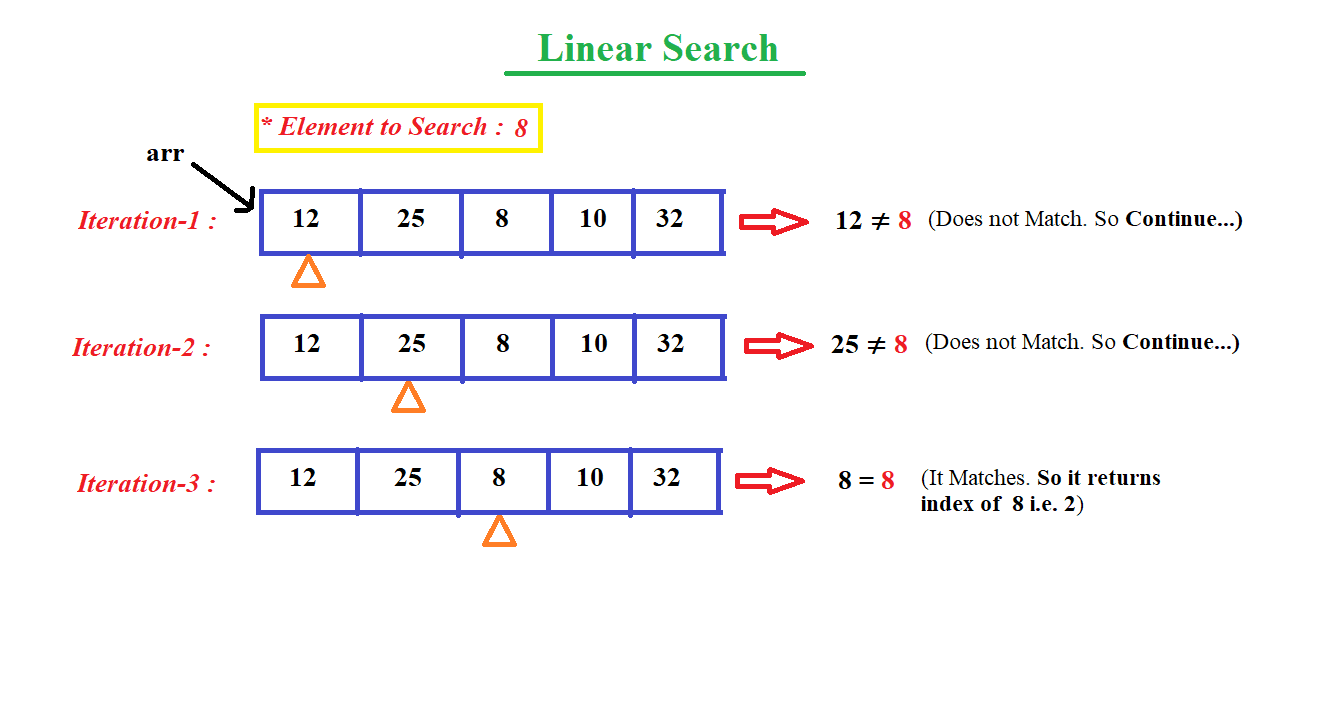
Dry Run Example
Array:  [10, 20, 30, 40, 50]
Target: 30

i = 0 → 10 ≠ 30
i = 1 → 20 ≠ 30
i = 2 → 30 = 30 → FOUND
Result: Index 2
Time and Space Complexity
| Metric | Value |
|---|---|
| Time Complexity | O(n) |
| Best Case | O(1) |
| Worst Case | O(n) |
| Space Complexity | O(1) |
Language-wise Implementation
C Implementation
#include

int main() {
    int arr[] = {10, 20, 30, 40, 50};
    int target = 30;
    int n = sizeof(arr) / sizeof(arr[0]);
    int foundIndex = -1;

    for(int i = 0; i < n; i++) {
        if(arr[i] == target) {
            foundIndex = i;
            break;
        }
    }

    if(foundIndex != -1)
        printf("Element found at index %d", foundIndex);
    else
        printf("Element not found");

    return 0;
}
Output
Element found at index 2
C++ Implementation
#include
using namespace std;

int main() {
    int arr[] = {10, 20, 30, 40, 50};
    int target = 30;
    int n = sizeof(arr) / sizeof(arr[0]);

    for(int i = 0; i < n; i++) {
        if(arr[i] == target) {
            cout << "Element found at index " << i;
            return 0;
        }
    }

    cout << "Element not found";
    return 0;
}
Output
Element found at index 2
Java Implementation
public class Main {
    public static void main(String[] args) {
        int[] arr = {10, 20, 30, 40, 50};
        int target = 30;
        int index = -1;

        for(int i = 0; i < arr.length; i++) {
            if(arr[i] == target) {
                index = i;
                break;
            }
        }

        if(index != -1)
            System.out.println("Element found at index " + index);
        else
            System.out.println("Element not found");
    }
}
Output
Element found at index 2
Python Implementation
arr = [10, 20, 30, 40, 50]
target = 30
index = -1

for i in range(len(arr)):
    if arr[i] == target:
        index = i
        break

if index != -1:
    print("Element found at index", index)
else:
    print("Element not found")
Output
Element found at index 2
C# Implementation
using System;

class Program {
    static void Main() {
        int[] arr = {10, 20, 30, 40, 50};
        int target = 30;
        int index = -1;

        for(int i = 0; i < arr.Length; i++) {
            if(arr[i] == target) {
                index = i;
                break;
            }
        }

        if(index != -1)
            Console.WriteLine("Element found at index " + index);
        else
            Console.WriteLine("Element not found");
    }
}
Output
Element found at index 2
JavaScript Implementation
let arr = [10, 20, 30, 40, 50];
let target = 30;
let index = -1;

for (let i = 0; i < arr.length; i++) {
    if (arr[i] === target) {
        index = i;
        break;
    }
}

if (index !== -1)
    console.log("Element found at index", index);
else
    console.log("Element not found");
Output
Element found at index 2
Edge Cases to Consider
- Element at first index
- Element at last index
- Element not present
- Array with duplicate elements
- Empty array
Common Mistakes
- Forgetting to break after finding the element
- Returning incorrect index
- Not handling empty array
- Confusing value with index
Interview Notes
Interviewers evaluate:
- Correct traversal logic
- Early termination using break
- Time complexity awareness
Follow-up questions:
- Binary Search (sorted arrays)
- First and last occurrence
- Count frequency of target
Summary
Linear Search is the simplest and most intuitive searching technique. Although not optimal for large datasets, it is extremely effective for unsorted arrays and small input sizes. Understanding linear search is crucial before moving on to optimized searching algorithms.
.png)

.png)
.png)

.png)
.png)
.png)
.png)
.png)
.png)
.png)
.png)
.png)

.png)
.png)
.png)
.png)
.png)
.png)
.png)
.png)
.png)
.png)
.png)
.png)
.png)
.png)
.png)
.png)
.png)
.png)
.png)
.png)
.png)
.png)
.png)
.png)
.png)
.png)
.png)
.png)
.png)
.png)
.png)
.png)
.png)
.png)
.png)
.png)
.png)
.png)
.png)
.png)
.png)
.png)
.png)
.png)
.png)
.png)
.png)
.png)
.png)
.png)
.png)
.png)
.png)
.png)
.png)
.png)
.png)
.png)
.png)
.png)
.png)
.png)
.png)
.png)
.png)
.png)
.png)
.png)
.png)
.png)
.png)
.png)
.png)
.png)
.png)
.png)
.png)
.png)
.png)
.png)
.png)
.png)
.png)
.png)
.png)
.png)
.png)
.png)
.png)

.jpg)
.png)
.jpg)
.jpg)
.png)
