.png)
Find the Length of an Array
Problem Statement
Given an array, the task is to find the total number of elements present in the array, commonly referred to as the length or size of the array.
This problem focuses on understanding how arrays store elements and how their size is determined in different programming languages.
Why This Problem Is Important
Knowing the length of an array is essential because:
- It determines how many times a loop should run
- It prevents out-of-bounds access
- It is required for traversal, searching, sorting, and manipulation
- It helps in memory management and performance optimization
Almost every array-based algorithm begins by determining the array size.
Input and Output Format
Input
Array: [10, 20, 30, 40, 50]
Output
Length of the Array: 5
Key Concept
- Arrays store elements in contiguous memory locations
- The length represents the total number of elements
- The method to find length differs across programming languages
Approach Overview
In Low-Level Languages (C/C++)
- Use memory size calculation
- Formula:
length = total memory of array / memory of one element
In High-Level Languages (Java, Python, C#, JavaScript)
- Use built-in properties or functions
Step-by-Step Algorithm (General)
- Access the array
- Use language-specific method to get size
- Print the length
Pseudocode
length = size_of_array
print length
Dry Run Example
Array = [10, 20, 30, 40, 50]

Elements count = 5
Time and Space Complexity
| Metric | Value |
|---|---|
| Time Complexity | O(1) |
| Space Complexity | O(1) |
Language-wise Implementation
C Implementation
#include

int main() {
    int arr[] = {10, 20, 30, 40, 50};

    int length = sizeof(arr) / sizeof(arr[0]);

    printf("Length of the Array: %d", length);
    return 0;
}
Output
Length of the Array: 5
C++ Implementation
#include
using namespace std;

int main() {
    int arr[] = {10, 20, 30, 40, 50};

    int length = sizeof(arr) / sizeof(arr[0]);

    cout << "Length of the Array: " << length;
    return 0;
}
Output
Length of the Array: 5
Java Implementation
public class Main {
    public static void main(String[] args) {
        int[] arr = {10, 20, 30, 40, 50};

        System.out.println("Length of the Array: " + arr.length);
    }
}
Output
Length of the Array: 5
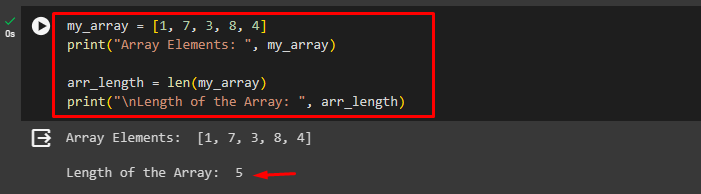
Python Implementation
arr = [10, 20, 30, 40, 50]

length = len(arr)

print("Length of the Array:", length)
Output
Length of the Array: 5
C# Implementation
using System;

class Program {
    static void Main() {
        int[] arr = {10, 20, 30, 40, 50};

        Console.WriteLine("Length of the Array: " + arr.Length);
    }
}
Output
Length of the Array: 5
JavaScript Implementation
let arr = [10, 20, 30, 40, 50];

console.log("Length of the Array:", arr.length);
Output
Length of the Array: 5
Important Notes
- In C/C++, length can only be calculated this way inside the same scope
- In functions, array decays into a pointer (size info is lost)
- High-level languages store size internally
Common Mistakes
- Trying to use sizeof inside functions in C
- Manually counting elements unnecessarily
- Confusing last index with length
- Off-by-one errors
Interview Variations
- Find array length without using built-in functions
- Find length of array using loops
- Find length of string vs array
- Dynamic array length handling
Summary
Finding the length of an array is a fundamental operation that underpins all array-based algorithms. While high-level languages provide direct properties or functions to access array size, low-level languages like C and C++ require an understanding of memory allocation and element size. Mastering this concept ensures safe traversal, efficient memory usage, and accurate implementation of array algorithms. This knowledge becomes especially critical when dealing with dynamic arrays, pointers, and performance-sensitive applications.
.png)

.png)
.png)

.png)
.png)
.png)
.png)
.png)
.png)
.png)
.png)
.png)

.png)
.png)
.png)
.png)
.png)
.png)
.png)
.png)
.png)
.png)
.png)
.png)
.png)
.png)
.png)
.png)
.png)
.png)
.png)
.png)
.png)
.png)
.png)
.png)
.png)
.png)
.png)
.png)
.png)
.png)
.png)
.png)
.png)
.png)
.png)
.png)
.png)
.png)
.png)
.png)
.png)
.png)
.png)
.png)
.png)
.png)
.png)
.png)
.png)
.png)
.png)
.png)
.png)
.png)
.png)
.png)
.png)
.png)
.png)
.png)
.png)
.png)
.png)
.png)
.png)
.png)
.png)
.png)
.png)
.png)
.png)
.png)
.png)
.png)
.png)
.png)
.png)
.png)
.png)
.png)
.png)
.png)
.png)
.png)
.png)
.png)
.png)
.png)
.png)

.jpg)
.png)
.jpg)
.jpg)
.png)
